The AppMaker Assistant is an AI assistant built into App Factory Studio. It reads the live configuration of the selected domain and helps configurators write rules and understand existing screens and workflows. It also builds new features, writing configuration after the configurator approves a plan.
Where it runs
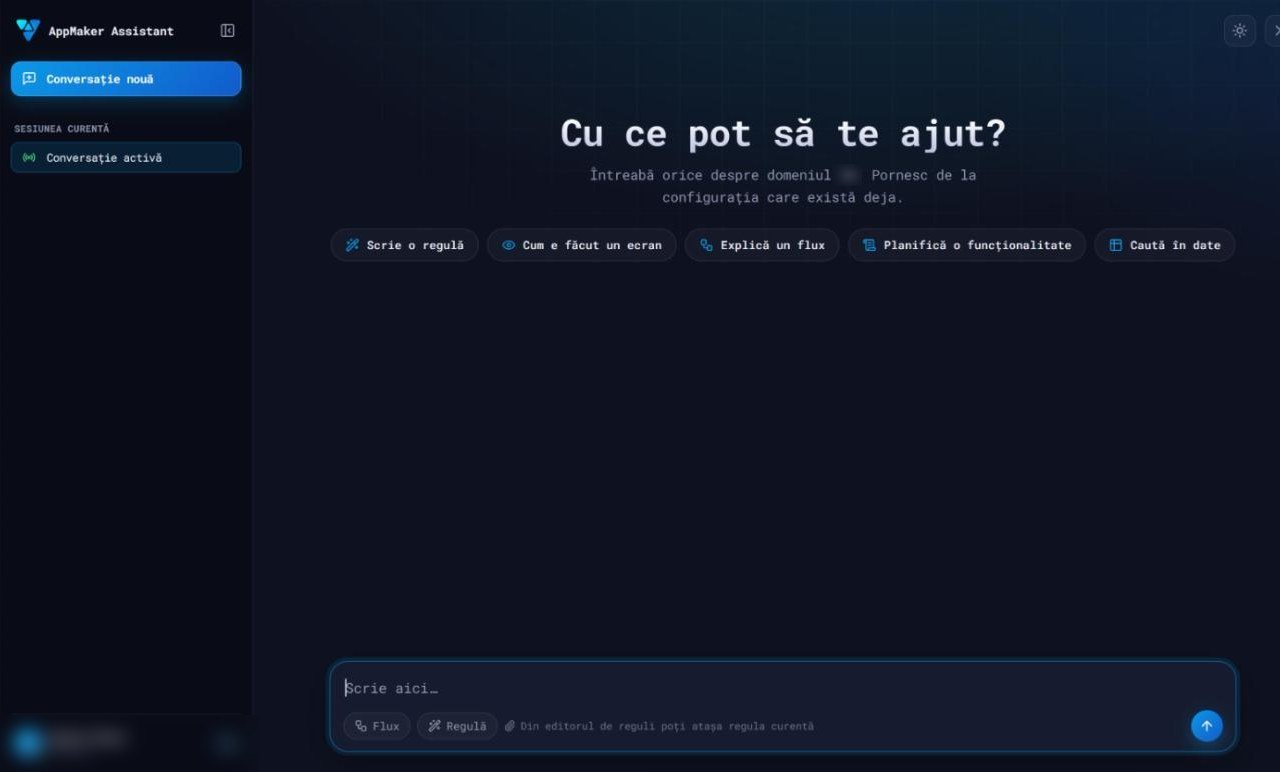
The assistant opens as a chat drawer on the right side of App Factory Studio. It works on the domain currently selected and starts from the configuration that already exists there. Only authenticated users can use it.
The start screen offers five starting points:
| Starting point | What the assistant does |
|---|---|
| Write a rule | Drafts a business rule from a description, validates it on the engine and checks its references |
| How a screen is built | Reads a module end to end: activities, views, the rules each view calls, the workflow with its states, transitions and permissions |
| Explain a flow | Explains an existing workflow from its real states, transitions, approvers and rules |
| Plan a feature | Proposes a plan across the configuration layers, built by adapting the closest modules that already work, and applies it after approval |
| Search the data | Answers questions about parameters, entities, value lists, operators, plugins and the domain's data tables |
A flow or a rule can be attached to a question. From the rule editor, the rule being edited can be attached directly. Conversations are kept in a list, and long investigations proceed in steps that can be continued later.
Grounded in the live configuration
Answers cite real configuration items read from the domain: modules, services, workflow steps, approvers, rules and custom types. The operator catalog and the plugin catalog come directly from the running App Maker Engine. Semantic search over existing rules and configuration surfaces patterns already built on the platform.
Before proposing something new, the assistant checks whether a similar feature already exists. If one is close, it says so first and suggests extending it.
One domain at a time
An installation can hold several domains, each with its own modules, rules and data. The assistant always works in one named domain and does not guess which one is meant. Identifiers are specific to a domain: the same number can point to a different rule, plugin or permission in another domain.
A configurator can ask for something similar to a feature in another domain. The assistant reads that domain, copies the shape of the solution and resolves every identifier again in the target domain.
How rule proposals are checked
Every rule the assistant proposes goes through the same checks:
- It finds close existing rules in the domain and in a library of curated examples, and adapts one.
- It parses the rule with the real App Maker Engine, the same parser used at runtime.
- It checks every referenced rule, plugin, parameter and entity field against the domain configuration.
- It corrects what the checks report and validates again.
- It shows the result as a highlighted fragment for the configurator to review.
How it builds a feature
The assistant writes configuration through a plan that the configurator approves. A feature is built as one plan that contains every step, from data to screens.
- It reads several working modules in the domain. Their shared habits serve as the template.
- It writes one plan with all steps. A step can refer to an item created by an earlier step in the same plan.
- The whole plan is checked in one pass and shown to the configurator.
- The configurator approves the plan once, and the assistant applies it.
- It refreshes the domain and test-starts the module the way the application starts it.
- It reports the failures that appear at runtime, such as an unresolved rule or a workflow with no transition available.
A feature is reported as done only after this test start. When the configurator asks for changes, the assistant reworks the plan and presents it again whole. It does not apply part of a plan.
As part of a plan, the assistant can also:
- create a business data table, without replacing a table that already exists;
- create a role, covering both its permissions and its menu side;
- lay out the workflow diagram automatically;
- find where a rule is used before changing it, and keep a backup of every rule it modifies.
The assistant never presents an identifier or a number it did not read in the current session. Counting questions are answered with a read-only query on the configuration.
What stays manual
Two steps are left to the administration interface on purpose:
- adding the menu entry for the new feature;
- assigning roles to user groups.
Use from AI clients over MCP
The same capabilities are available to MCP-capable AI clients, such as Claude. They connect through an MCP server attached to the installation and get tools to:
- list domains and check whether a feature already exists;
- describe modules and workflows, read rules, and search parameters, entities and value lists;
- list operators and plugins, and validate rules on the engine;
- build a feature with the same plan-and-approve method: one plan, one approval, then a domain refresh and a test start.
A skill installed in the client teaches the build method. It covers the order in which a feature is assembled and the principle that every identifier must come from a tool result. The method itself is served by the MCP server, so clients always receive the version the installation runs.
The build method follows a bottom-up order: the module and its workflow, then views, parameters and value lists, then rules, and finally the view markup and the events that bind buttons to rules. Requests are written in plain language and name the domain.