A workflow models a real-life process as a succession of activities that move an instance from one state to another. Each process module in Vision App Maker can have one workflow, designed visually in App Factory Studio.
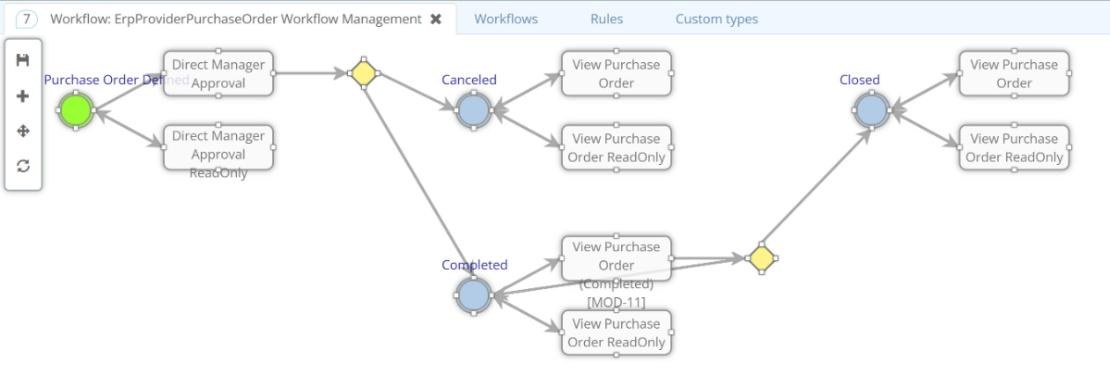
Structure of a workflow
A workflow is the path that the module's instances follow. It is made of states and activities, linked by transitions. It needs at least one state and one activity, and the final state can be the same as the start state.
- State: a status the instance is in, such as New, Approved or Rejected.
- Activity: a step the user performs or the system runs automatically.
- Transition: starts from a state, runs an activity and leads to one or more possible new states.
- Decision: when a transition has several possible new states, a decision selects one.
The workflow is opened from the module with Edit workflow. The designer shows states as circles, activities as boxes and decisions as diamonds, using simplified BPMN-style symbols. The architecture diagrams describe the same chain: a state, an action, an optional decision and one of several next states.
Activities
An activity belongs to a module and has a name for each application language. Its activity state setting is Persistent, NonPersistent or PersistentOnView. With Persistent, the instance is saved in a dedicated table, so the platform keeps the state and the activity where the workflow stopped.
An activity marked Is automatic runs through a service, without a user starting it. Otherwise, the activity shows one or more views. Each view is editable or read-only, can depend on a condition, and comes with a navigation menu that can be disabled.
States
A state needs only a name, plus a label for each language. States are defined in the domain and reused by several workflows. The start and final states follow from the diagram. A state with outgoing transitions and none incoming is the start; a state with no outgoing transitions is final. The process also records which state new instances begin in.
Transitions
A transition is configured by selecting an arrow from a state to an activity. It has these settings:
| Setting | Purpose |
|---|---|
| Bindings | Events executed on the transition. Each has a target (a rule, a parameter or a connector), an availability condition, a message to display and a Post execute option. A Post execute binding runs immediately before the transition is carried out. |
| Permissions | Which permissions can load the activity for an instance in this state. |
| Is default | The instance enters this transition automatically, without the user selecting the activity. |
| Availability | A condition that must be met for a user to access the instance at this activity: a rule, a parameter, a connector value or a constant. |
| Decision rules | Choose the state the workflow reaches after the activity. |
| Predetermined | Marks a new state that is reached only when the action names it, such as a Reject button. |
Who can take a transition
Permissions are checked first and availability second. Permissions are attached to roles, so only users whose roles hold the permission see the transition. A transition with no permissions cannot be taken by anyone, including administrators.
How the next state is chosen
- If the transition has one possible new state, the workflow goes there.
- If the action names a state, the workflow goes to that state.
- Otherwise, decision rules are evaluated on the possible states not marked Predetermined.
Only one possible new state may have neither a decision rule nor the Predetermined flag. That state is the default, for example the one reached when the user simply submits an approval.
Logic around actions
The architecture diagrams name three moments around an action where configured logic can run: pre-action, post-action and post-endpoint. In configuration, module events run logic at the start and at the end of an activity and when the workflow state changes. Rules can also set the next state, display messages and start other actions at any step.
Process capabilities
- Versioning: instances already started continue on the previous version; new instances use the newly published one.
- Assignment: tasks go to users, roles or teams, with routes that depend on conditions such as a value or a department.
- Task inbox: users filter, sort and search their tasks and approve, redirect or complete them.
- Deadlines: SLAs and deadlines per task, with alerts when a deadline passes, and scheduled steps.
- Automation: automatic steps based on rules, process instances started from other processes, and data exchanged with external systems through plugins and APIs.
- Maps and AI: any step can show information on a GIS map and use responses from the AI component.
History and audit
Each instance keeps the log of its states, with the user, date, state, activity and comments. Requests and entities also keep an audit list. Each entry records the user, the date, the status before and after the action, and a description.