Build complex applications in a visual designer, with AI.
Proven in production. 100+ implementations in banking, insurance, automotive, pharma, public administration, distribution, travel and field services.
Visual development
Build without code
Design data models, business rules, screens, workflows and document templates in App Factory Studio. Rules use Excel-like formulas; workflows are drawn as states, activities and decisions.
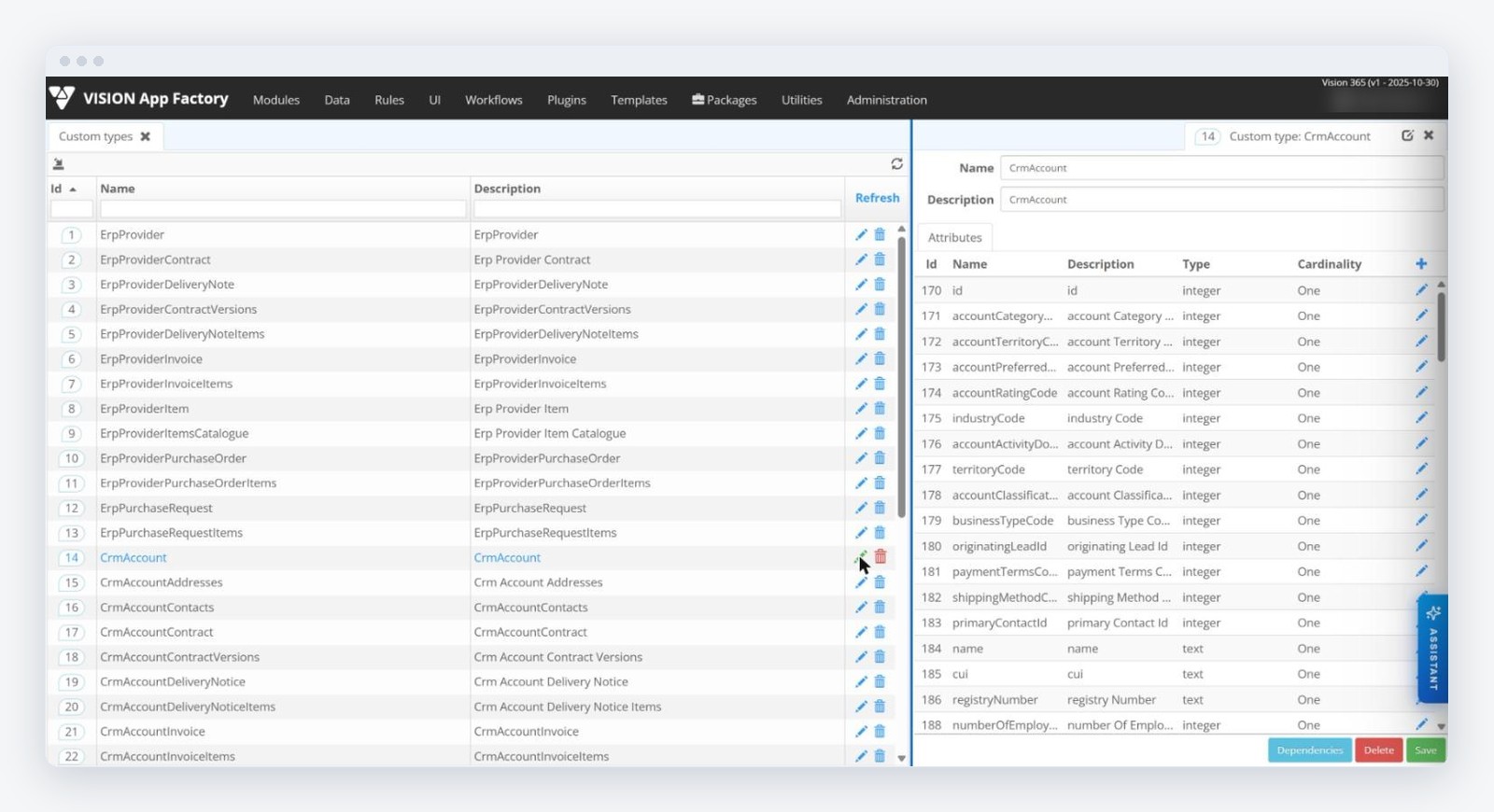
Data model and business rules
Define simple and complex data types, entities, attributes, cardinalities and reusable lists in the graphic designer. Build scoring, validations, escalations and interface behaviour with Excel-like expressions and predefined operators; every rule can be tested and inspected for dependencies before it goes live.
- Persistent and transient parameters, with default and dynamic values
- Rules reused in screens, workflow transitions, documents and services
- Conditional validation, visibility and editability in the interface
Workflows drawn, not coded
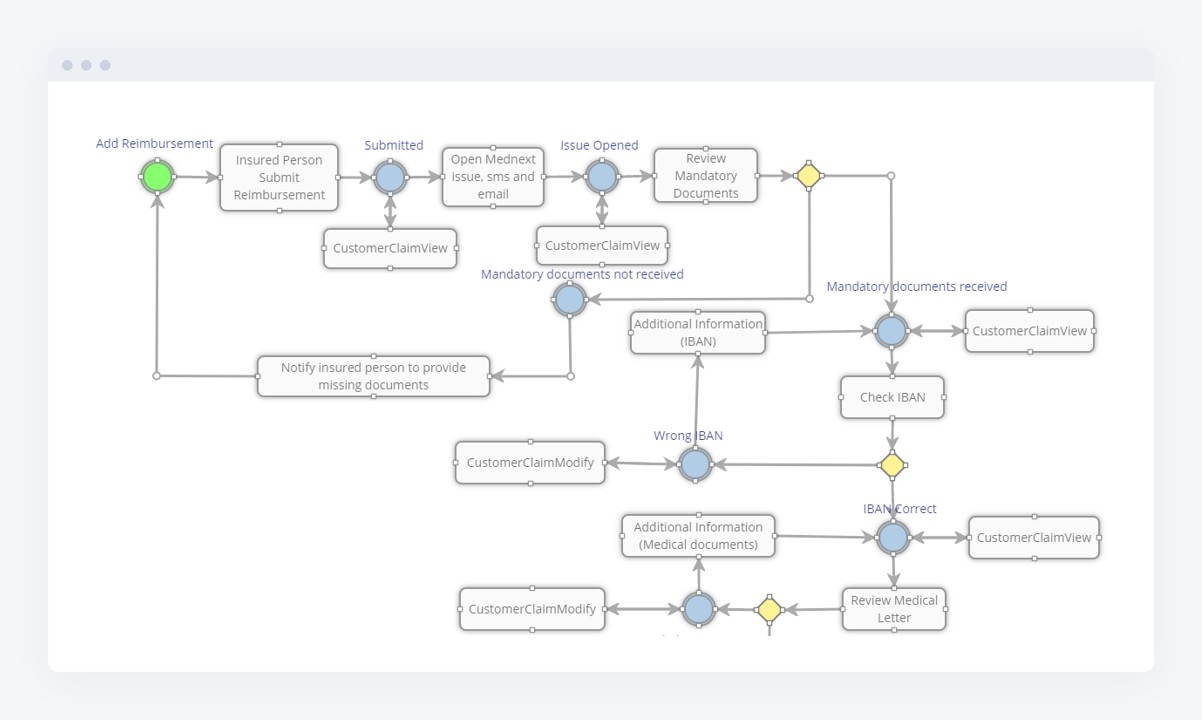
A workflow combines states, activities, transitions and decision rules, with permissions and events at each step. Human tasks, approvals and automated steps live in the same diagram, so a purchase approval, a citizen request or a credit file follows one visible path from start to close.
- Visual editor for states, activities, transitions and decisions
- Role-based permissions on every step
- Comments, history and audit on each process instance
Interfaces and documents
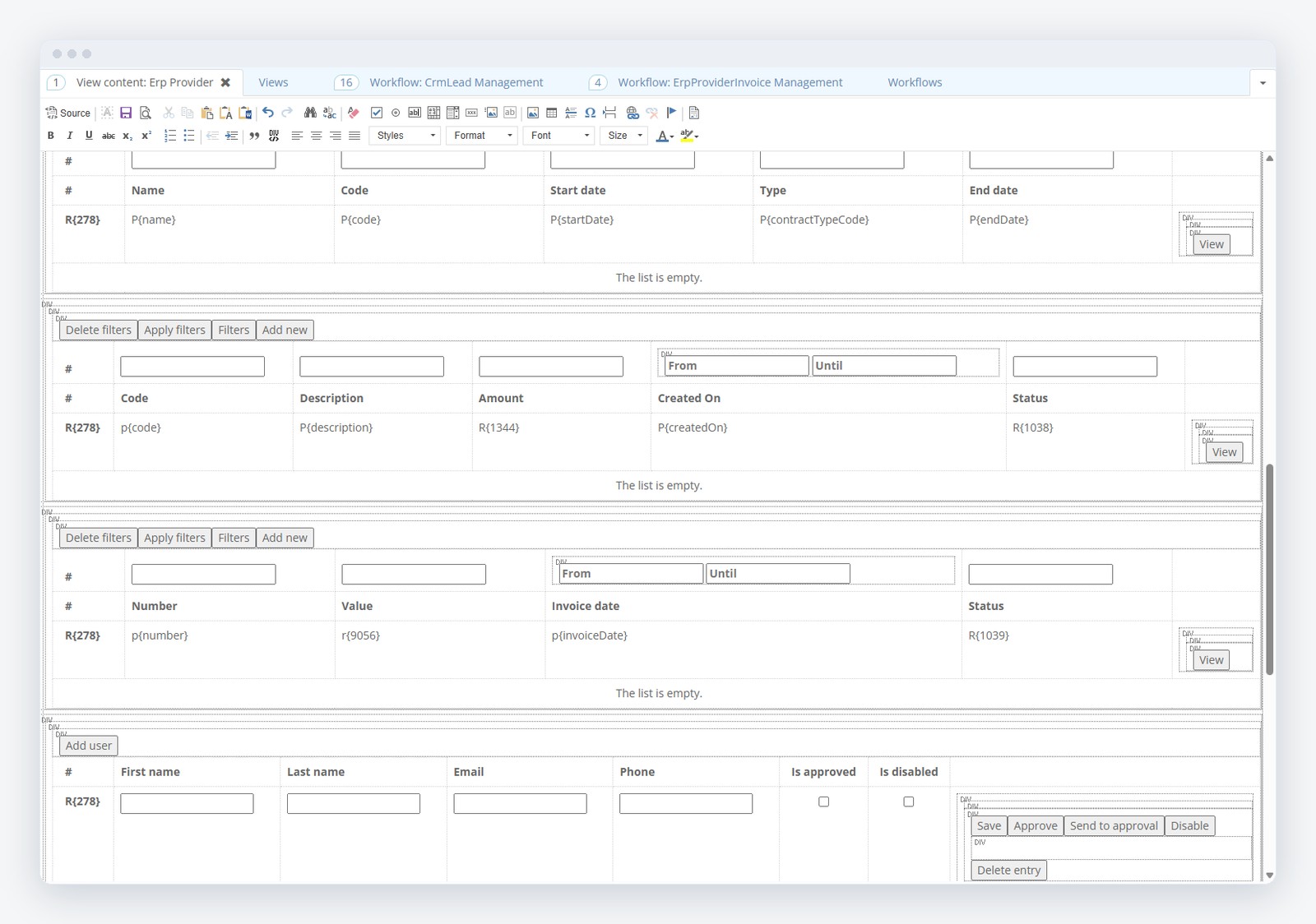
Connect responsive screens and reusable controls to process data and rules in the interface editor. Generate PDF documents from templates with registration numbers and QR codes, with versioning and OCR on the documents that come in.
- Single-page, responsive interfaces for web and mobile
- Document templates with electronic signature and generation
- Reusable modules packaged and exported between environments
AI-assisted development
Build with AI
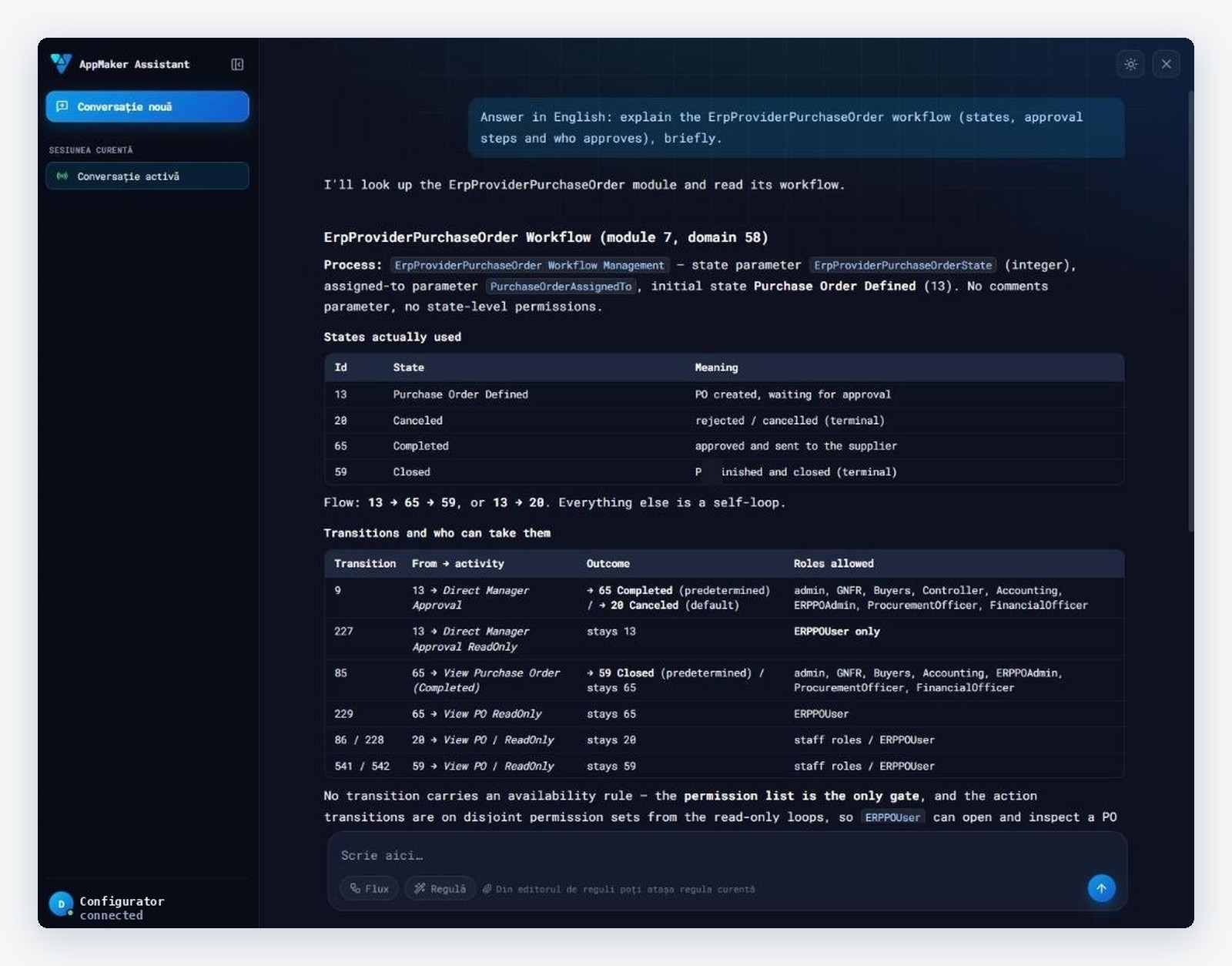
The AppMaker Assistant reads your live configuration, writes and validates rules, explains screens and flows, and builds whole features from one plan you approve. It creates tables and roles, lays out the workflow and test-starts the module before reporting back.
AppMaker Assistant
Ask it how a screen is built, what a rule does or who approves a request, and it answers from the configuration that actually runs: modules, parameters, rules, views and workflows. Ask it for a change and it proposes a plan, validates each rule on the execution engine and writes only after you approve.
- Context-aware: reads the module open in front of you
- Generates and validates business rules; "Ask AI" from the rule editor
- Builds a feature from one approved plan: tables, roles, flow, test start
- Available in App Factory Studio and through MCP for Claude and other AI clients
AI inside your workflows
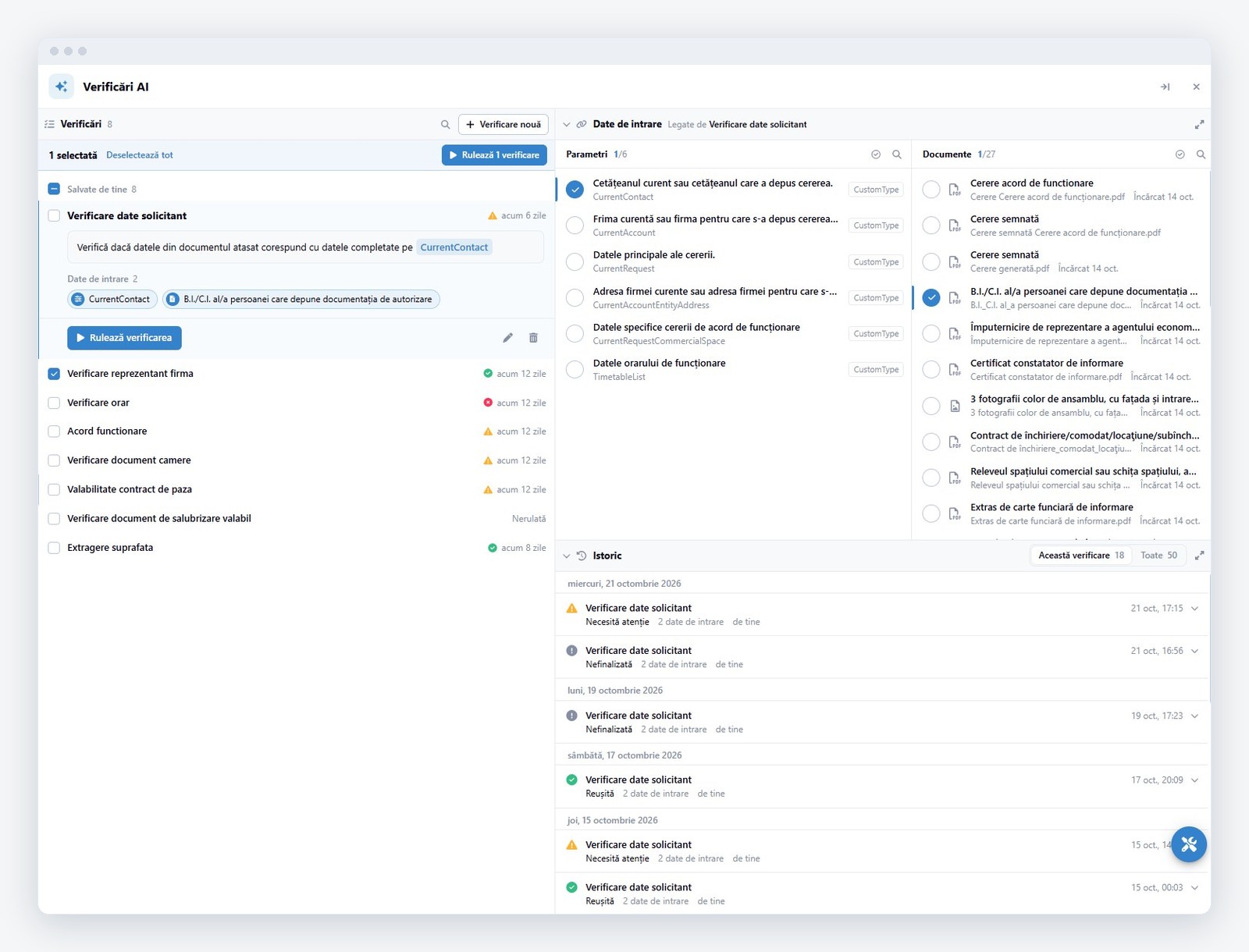
Add AI checks to any request: plain-language checks over the request data and the attached documents, with a full run history. A supplier onboarding file, a building permit or an invoice is verified against the rules of the service, and the result goes back into the process as PASS, FAIL or NEEDS MANUAL.
- Vision Smart Tasks: checks written in natural language, run on demand or from a workflow step
- AI operators in rules: model and prompt, result usable in any step of the flow
- OCR and document intelligence on the files attached to a request
Vision AI Flow
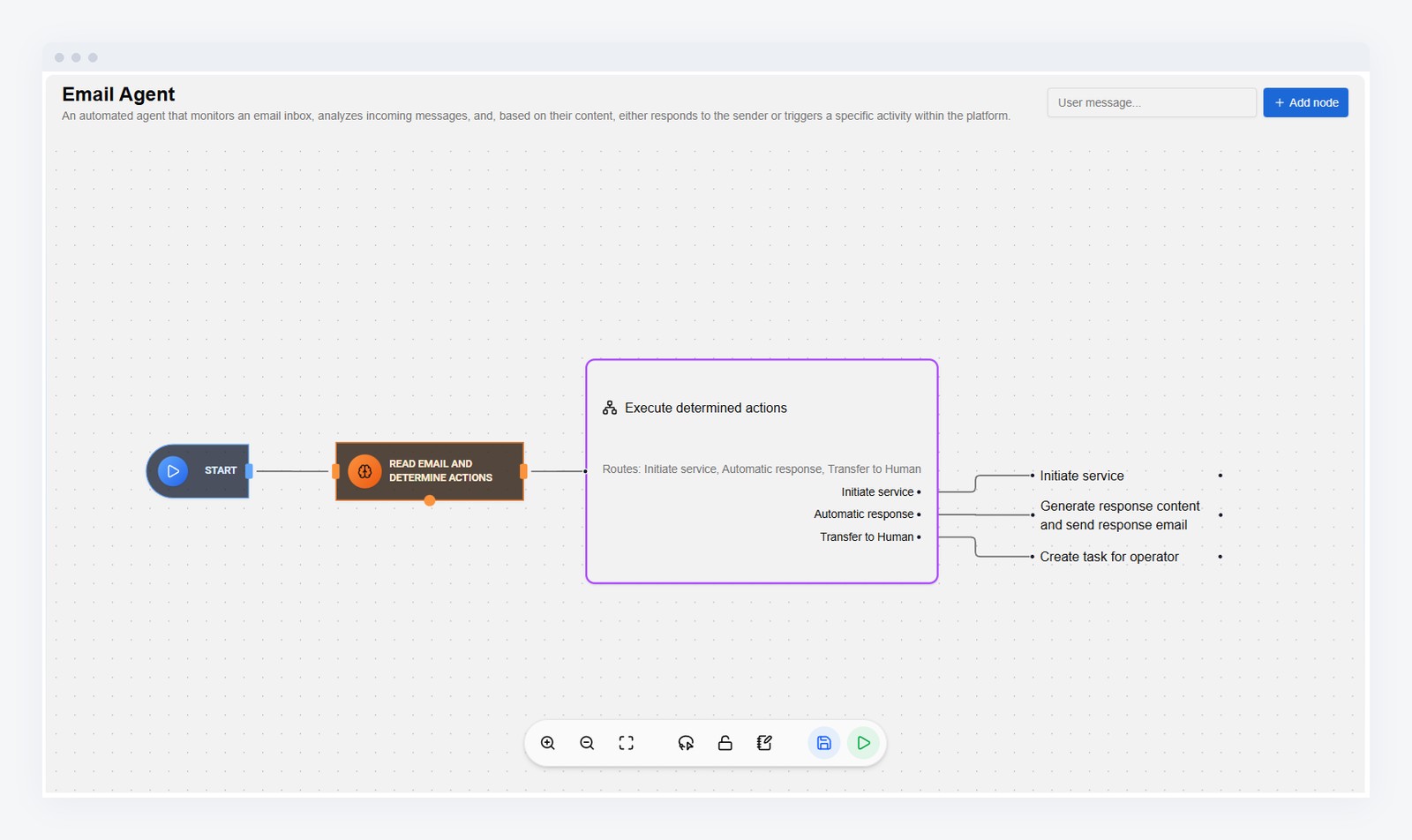
Orchestrate AI steps directly from the no-code BPM designer: define process sequences executed by AI, combine several models, and control how intelligence is applied, fully automated or with human validation. Intelligent sequences are designed in a graph-based visual interface and become executable parts of live business processes, triggered by events, user actions, system calls or data changes.
Business semantics
Rules your business can read, trace and change
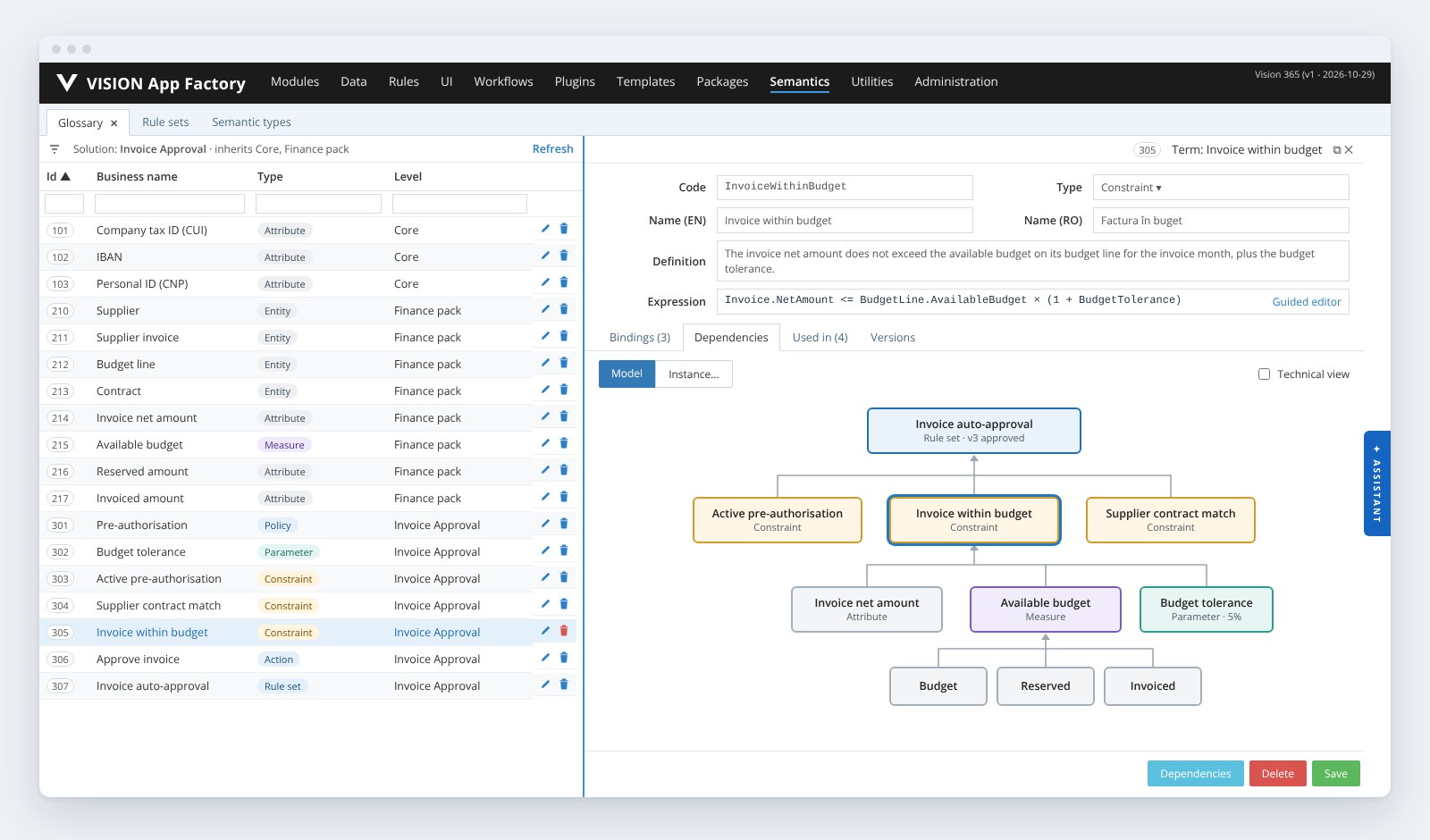
Every solution gets its own business vocabulary: suppliers, invoices, budget lines, available budget, approval limits. Each term is bound to the configuration that implements it, so screens, rules, reports and AI agents work with the same meaning.
One vocabulary per solution
Terms are organised on three levels: platform terms such as tax ID, IBAN or personal ID, domain packs such as Finance or eGov, and the terms of each solution. Every term is bound to the custom types, rules, parameters, transitions and views behind it, and its dependency graph shows what it is built from and where it is used.
- Entities, attributes, measures, states, actions, constraints, policies and parameters, defined in English and Romanian
- Semantic types carry length, format, validator and message to every screen that uses the term
- Dependency graph and impact analysis before any change
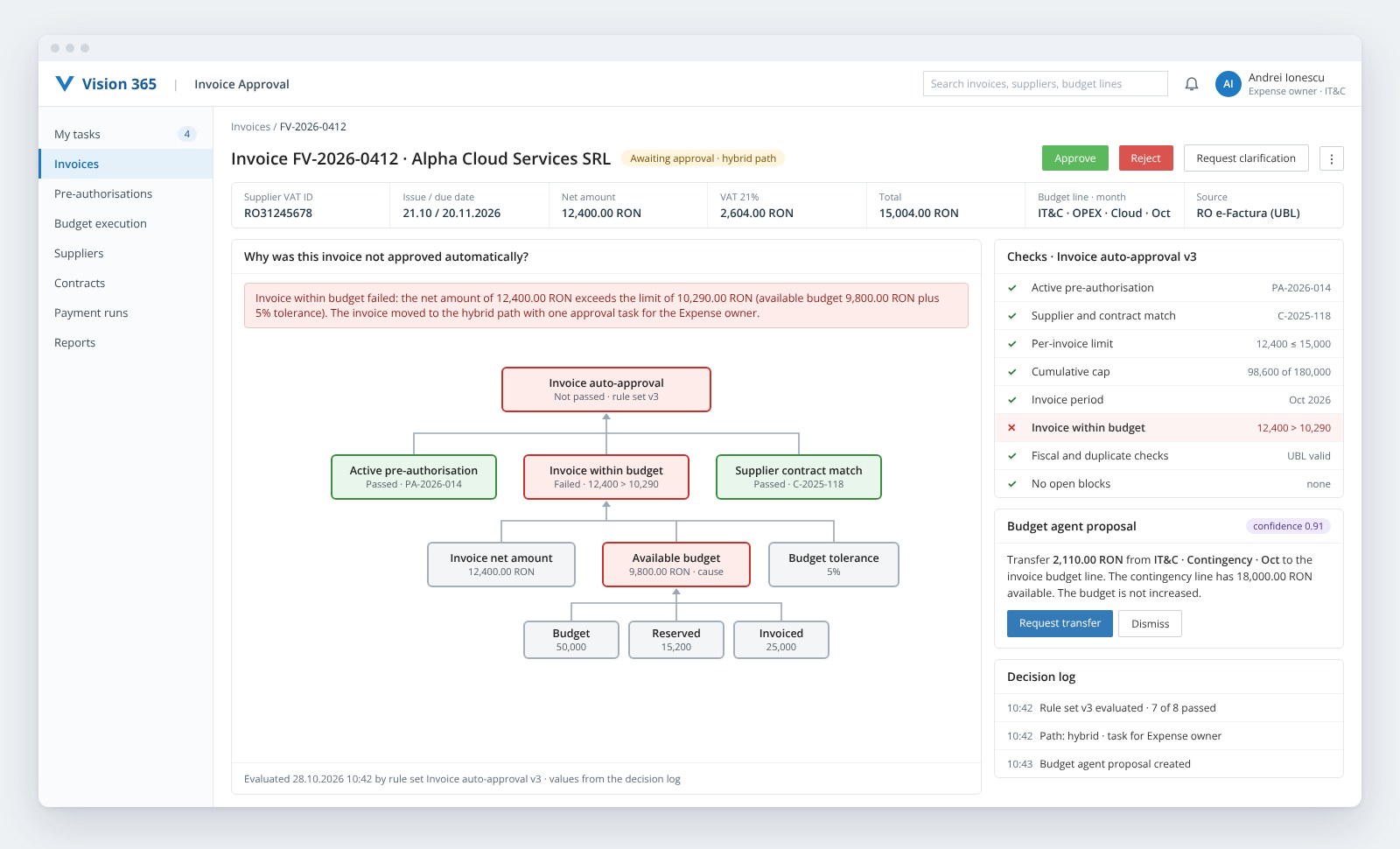
See why a decision was made
When a rule set decides, the platform records the version, the data it evaluated and the result of every check. Users open the explanation from the record itself: which checks passed, which failed, the values behind each one and the next step.
- Decision graph on the record, coloured by result, with the values from the decision log
- Agent proposals shown on the same business terms, with confidence and rationale
- Rule, version, data, actor and time kept for every automatic and manual decision
Change a rule without code, safely
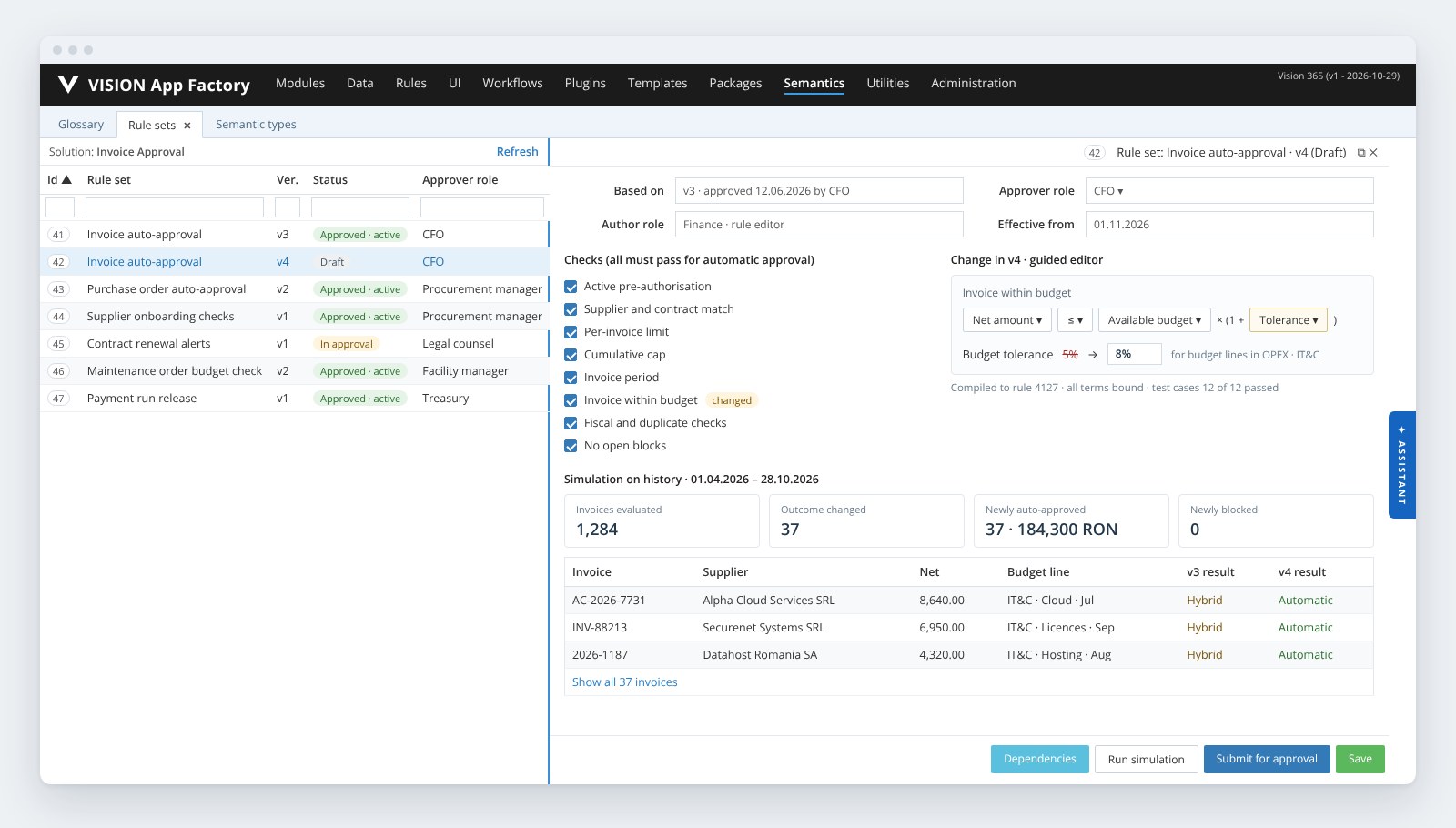
Business users with the right role change thresholds, policies and the checks in a rule set from a guided editor that works with the terms of the glossary. Each change becomes a new version, is simulated on past records, runs its test cases and is approved by the role that owns the rule set before its effective date.
- Guided editor on business terms: limits, tolerances, pre-authorisations and checks
- Simulation on history: which past records change outcome, with their count and value
- Versioned rule sets with approval and an effective date; records in progress keep their version
Agentic AI
Governed agents inside business processes
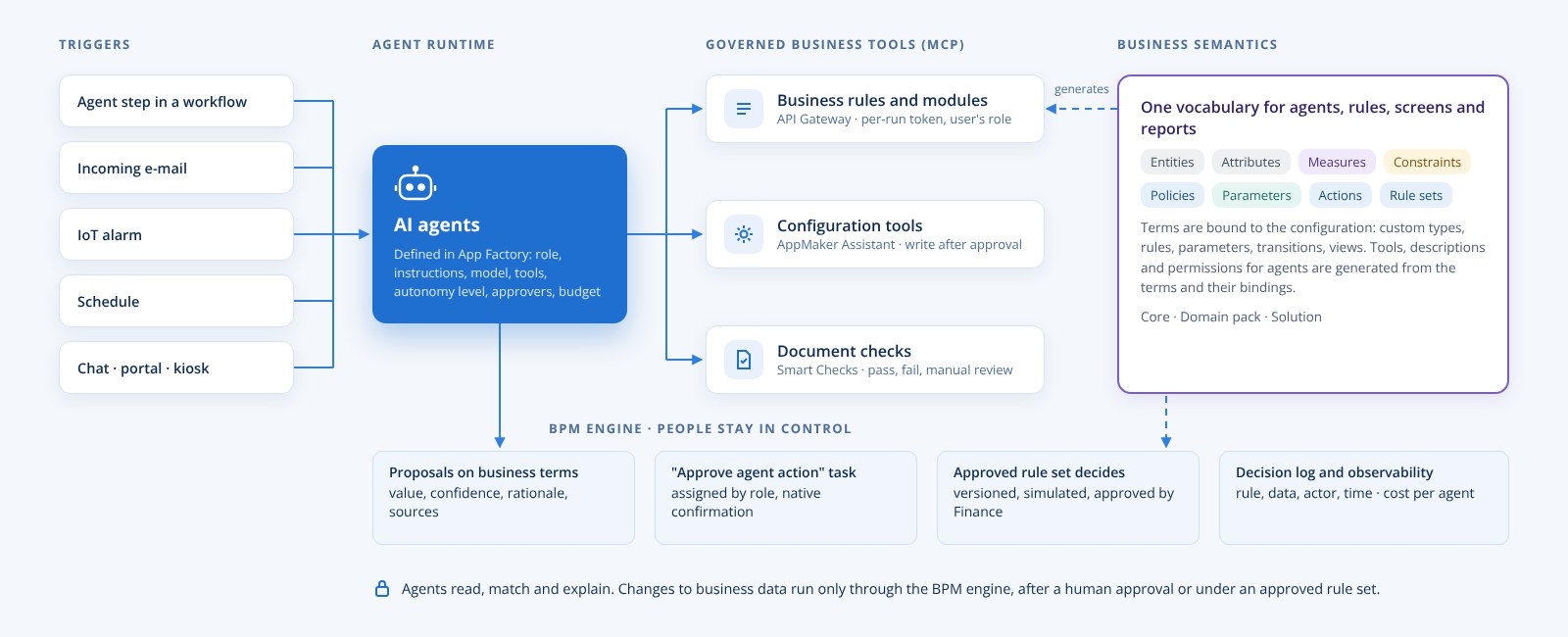
An agent in Vision App Maker is a configuration object, defined in App Factory on a domain and assigned to roles. Agents are started from a workflow step, an incoming e-mail, an IoT alarm, a schedule or a chat, and work with business tools generated from the business vocabulary. They read, match and explain; changes to business data go through the BPM engine, after a human approval or under a rule set approved by the business owner.
The same agent package, configured once, is activated for any customer of the solution: registry and petitions, urban planning files, supplier onboarding, invoice approval with budget control, preventive maintenance, alarm triage.
Agent designer in App Factory
Role and instructions, model and provider, permitted tools chosen from the business vocabulary, skills, autonomy level, approving roles, step and token budget.
Agent step and triggers
A workflow activity starts the run with the context of the case and stores the result as proposals on business terms. Runs also start from e-mail, IoT alarms, schedules and portal or kiosk chat.
Approvals as workflow tasks
When the agent asks for a write action, the run pauses and a native "Approve agent action" task is created on the configured role. The answer resumes the run.
Business tools through MCP
Rules, modules, configuration tools and document checks are MCP tools whose names, descriptions and inputs come from the business vocabulary. Each run uses a token on the role of the user who started it.
Rule sets decide
Automatic decisions come from versioned rule sets approved by the business owner. An agent action moves to full autonomy only under such a rule set, with every decision explained on the record.
Governed skills and observability
Skills are versioned with test cases and promoted after review. Run, agent, user, process instance, approval and decision are logged, with dashboards for outcomes, timings and cost per agent.
Agents run on local models in your own data centre or on cloud models, chosen per agent in App Factory. Assistants on citizen portals, kiosks and B2B portals state that they are AI; high-risk decisions stay with people, with complete logs.
Data & integrations
Your data, where it lives
Read and write live data in ERP, CRM, DMS, SQL databases, SharePoint, Alfresco and REST services from rules, forms, workflows and documents, without copying it. A catalog of ready plugins covers portal, data, files, e-mail, Excel and documents.
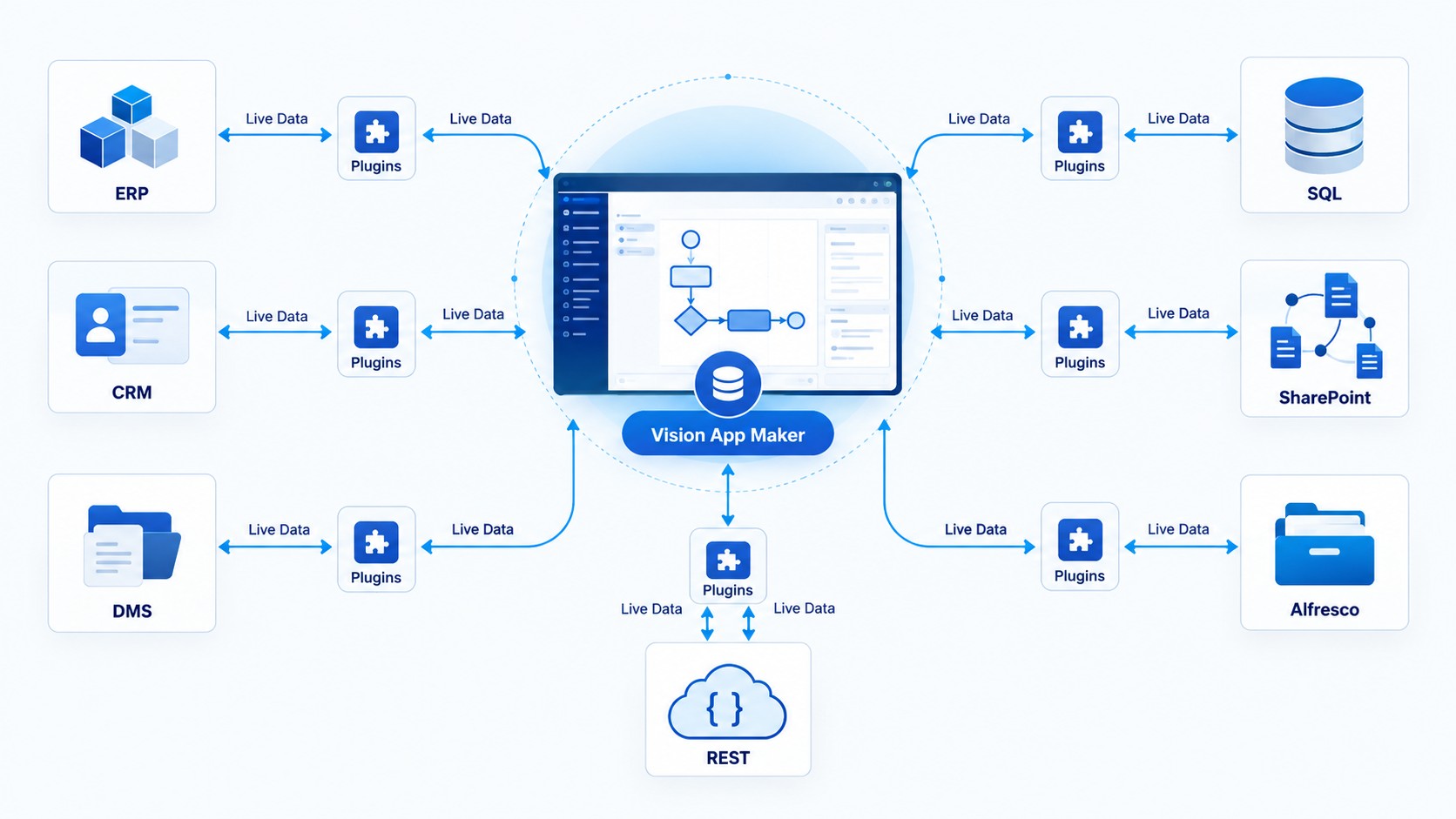
Live access through plugins
A plugin instance is configured once, with its connection and credentials, and then called from any rule: a form shows the customer from the ERP, a workflow step writes the contract back to the DMS, a document template pulls the balance from SQL Server. Results are cached per session; nothing is replicated unless you decide so.
- Plugins for REST/JSON, e-mail, files, documents, Excel and business systems
- JSON operators and a REST client usable directly in rules
- Integration through the API Gateway and application services
External data sources and the plugin catalog in the documentation
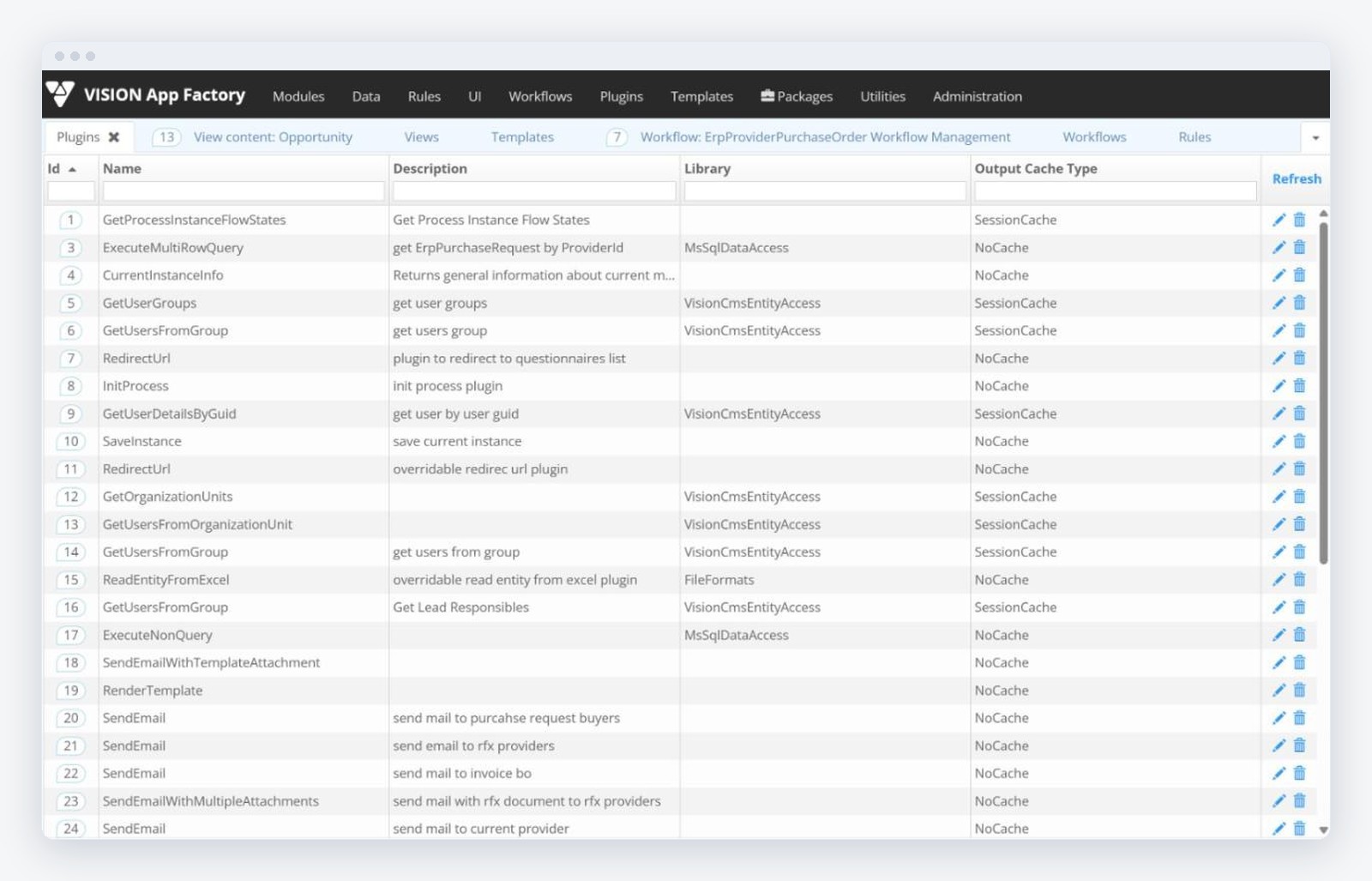
Plugin instances in App Factory
Each instance names the system it talks to, its parameters and the modules that may use it. The same plugin definition serves several instances: one per environment, per tenant or per external system.
APIs & MCP
Publish your business as APIs and AI tools
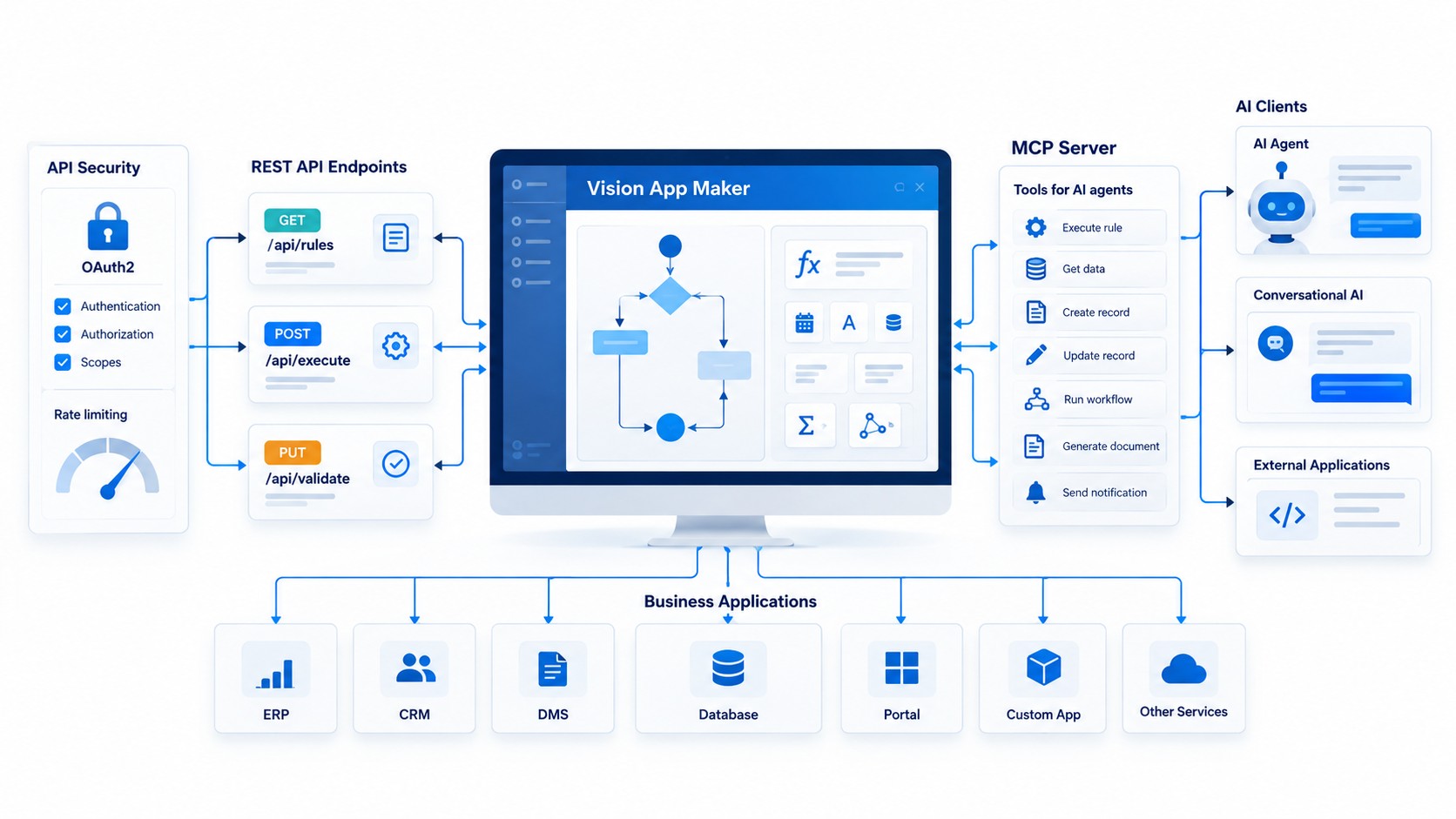
Expose any business rule as a REST endpoint with OAuth2 clients, scopes and rate limits, or as a tool for AI agents through the built-in MCP server. No code, live logs.
API endpoints without code
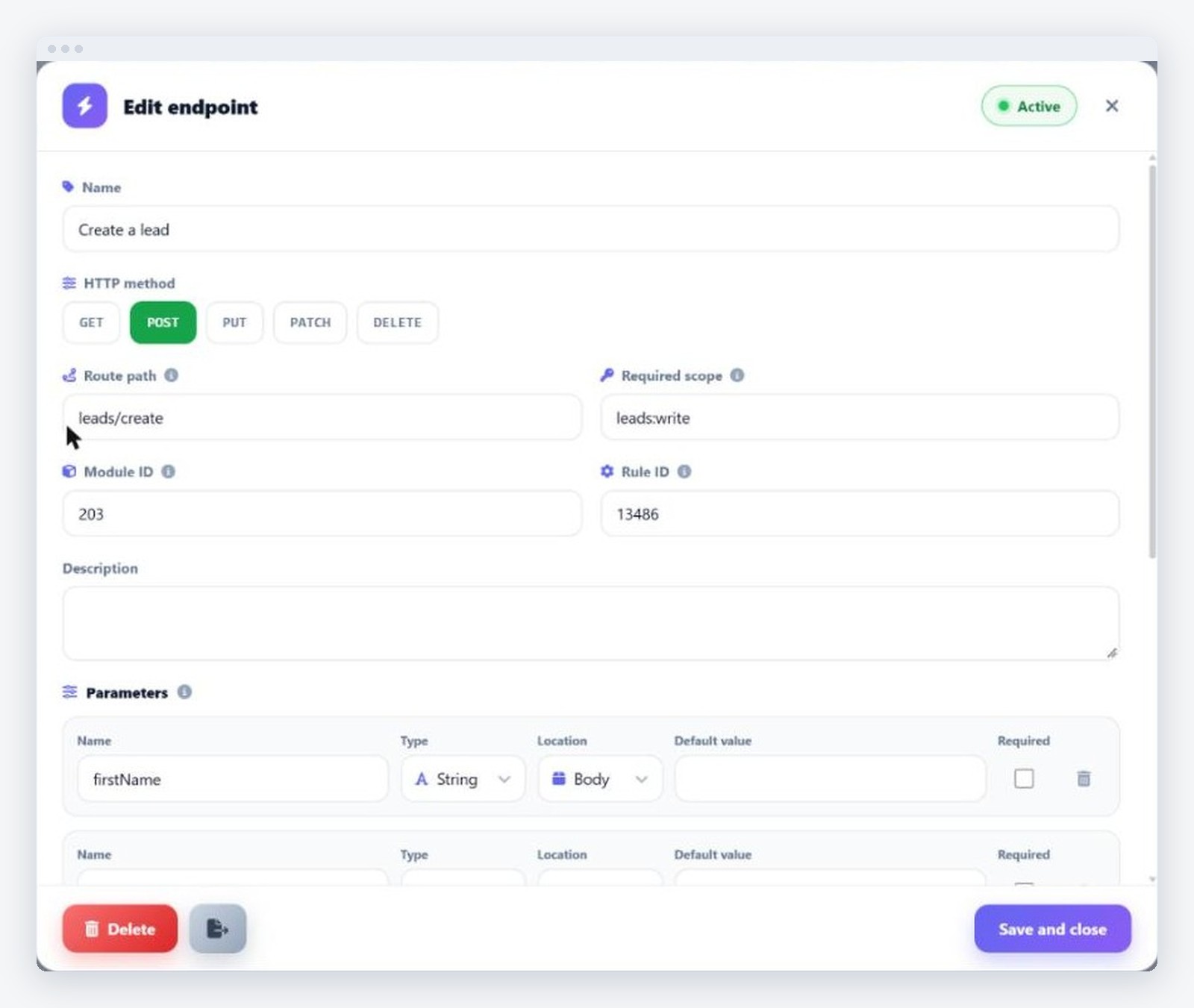
Choose the method, the route, the module and the rule, declare the typed parameters and publish. API clients receive client credentials with scopes; every call is rate-limited, logged and visible in the live console.
- GET, POST, PUT, PATCH and DELETE endpoints over configured rules
- OAuth2 client credentials, scopes and rate limiting per client
- Invocation log and live console for every endpoint
MCP server for AI clients
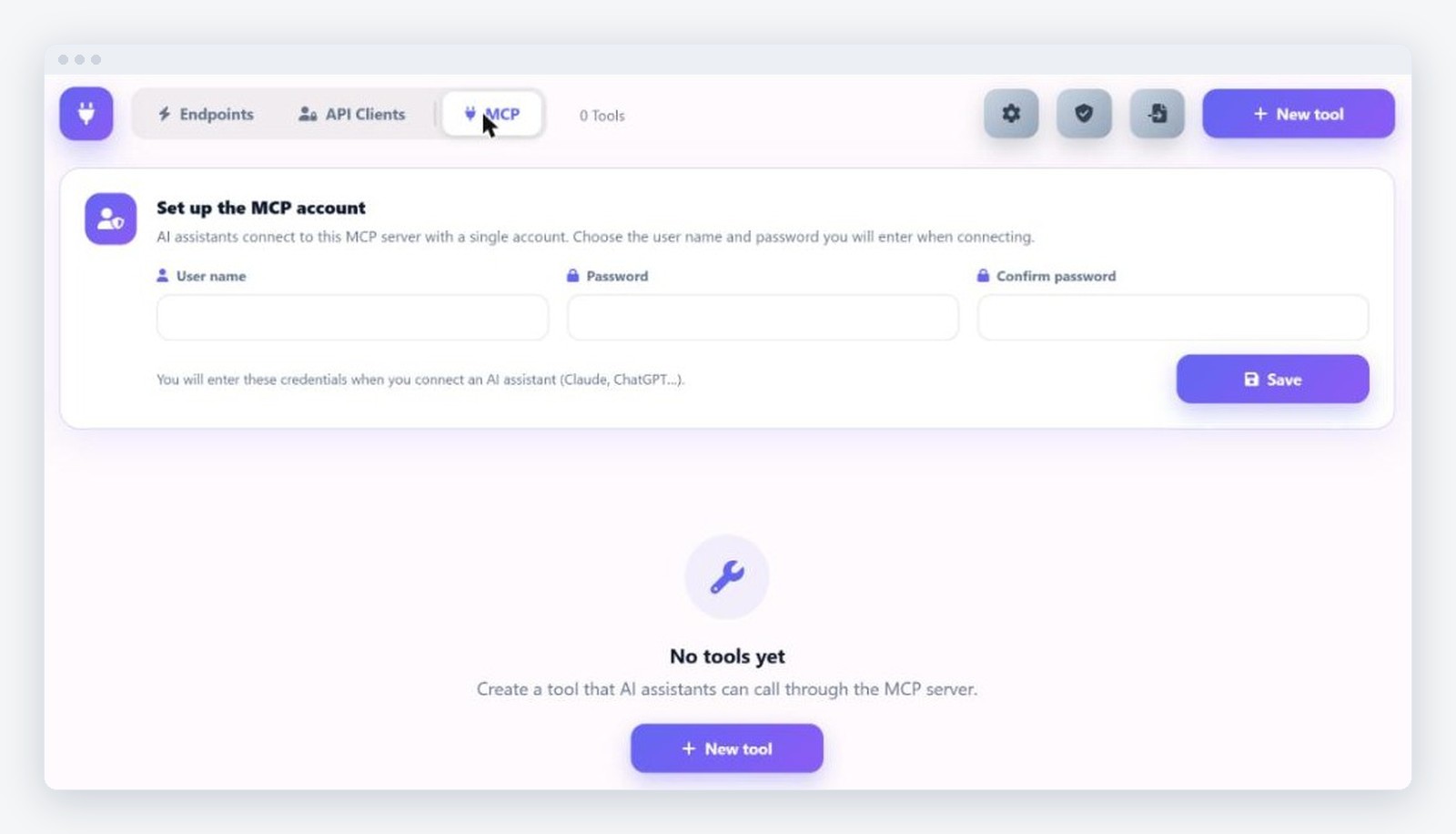
The same rules and modules are published as MCP tools, so Claude, ChatGPT or an agent inside the platform can read a request, check a supplier or draft a reply using governed business functionality. Connections use OAuth 2.1 with a dedicated MCP account or scoped tokens, can be revoked at any time, and every call is logged.
- Tools defined in the portal over existing rules, with description and schema
- OAuth 2.1, scoped tokens, revocable connections
- Log per call: who, what, when, with which result
Extensibility
Extend when you need to
Custom logic with JavaScript execution, rule composition and HTTP calls; plugins for any system; adapters for desktop devices and kiosks.
Custom logic
JavaScript execution inside rules, composition of rules, HTTP calls to external services, JSON operators.
Plugins and adapters
Plugin definitions for any backend; adapters for desktop devices, scanners, signature pads and information kiosks.
SDKs and API clients
Client credentials for external applications, SDKs for the published endpoints, React and Angular clients on the same API.
Architecture
One platform, built as services
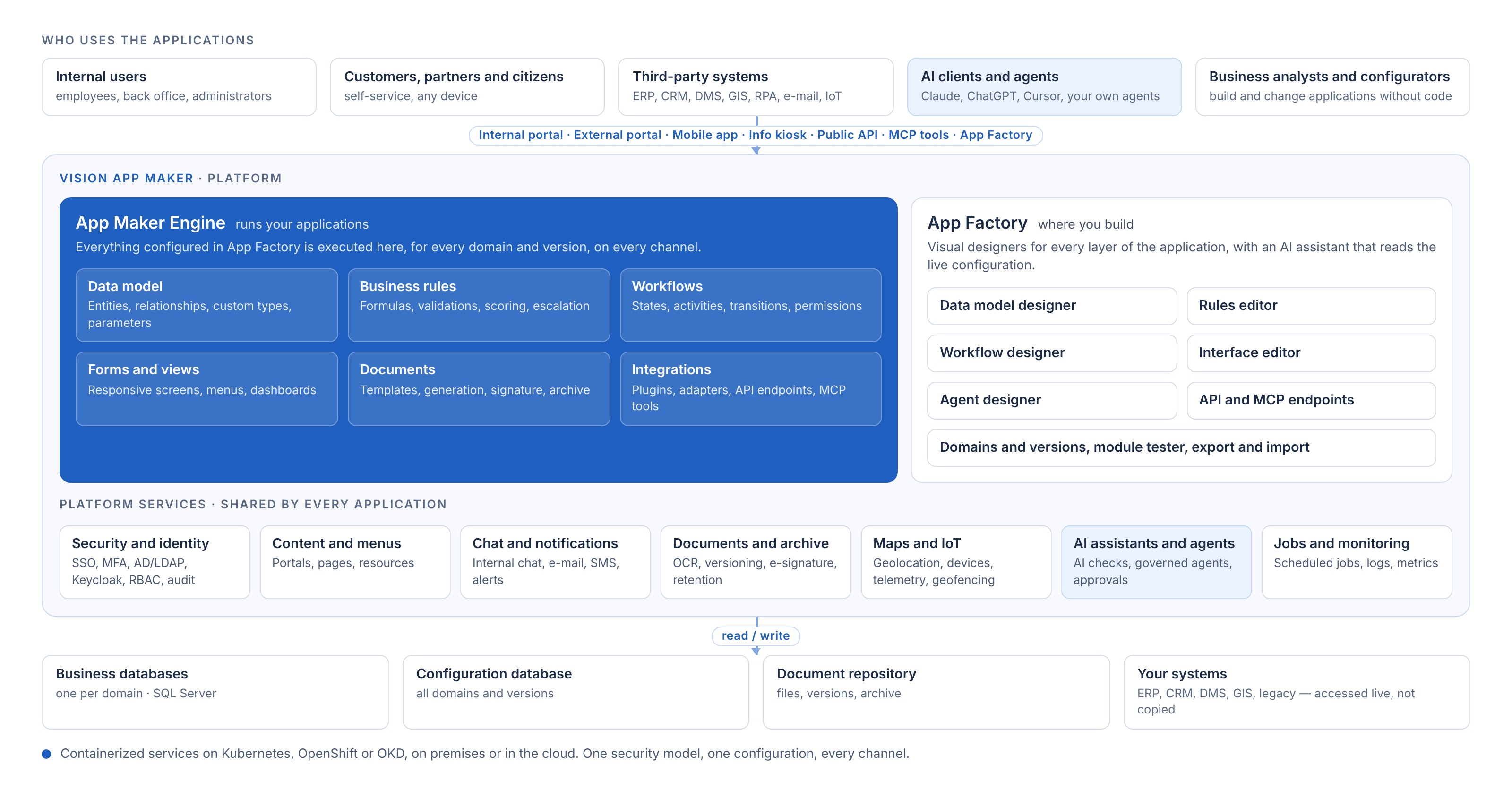
App Factory is where you build; the App Maker Engine runs what you built, for every domain and version, on every channel. Shared platform services such as identity, content, documents, maps, chat and AI are configured once and used by every application. Front ends talk to the API Gateway over REST, services talk to each other over gRPC, and each component scales on its own.
Security
Enterprise security by design
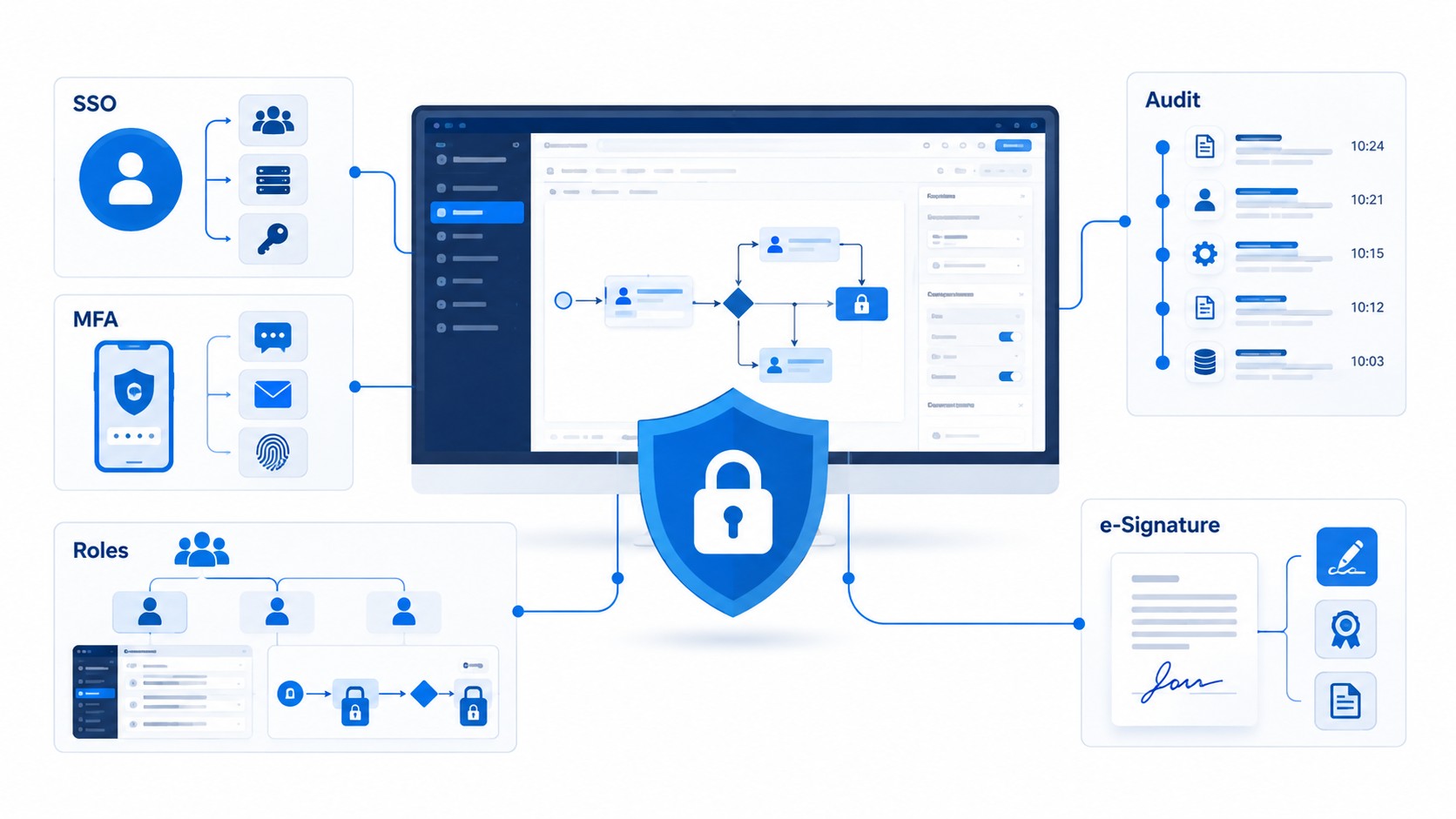
Single sign-on and MFA with Active Directory, LDAP or Keycloak (OIDC, OAuth 2.0, SAML 2.0); role-based access down to fields and workflow steps; API Gateway with rate limiting and IP allow-lists; full audit trail; electronic signature.
- Identity: AD/LDAP, Keycloak, SSO, MFA, standard protocols
- RBAC on menus, forms, workflow steps, documents and fields
- TLS everywhere; documents encrypted at rest and in transit; Vault for secrets
- Entity audit, activity log, electronic signature on documents
Runtime & deployment
Runs on your infrastructure
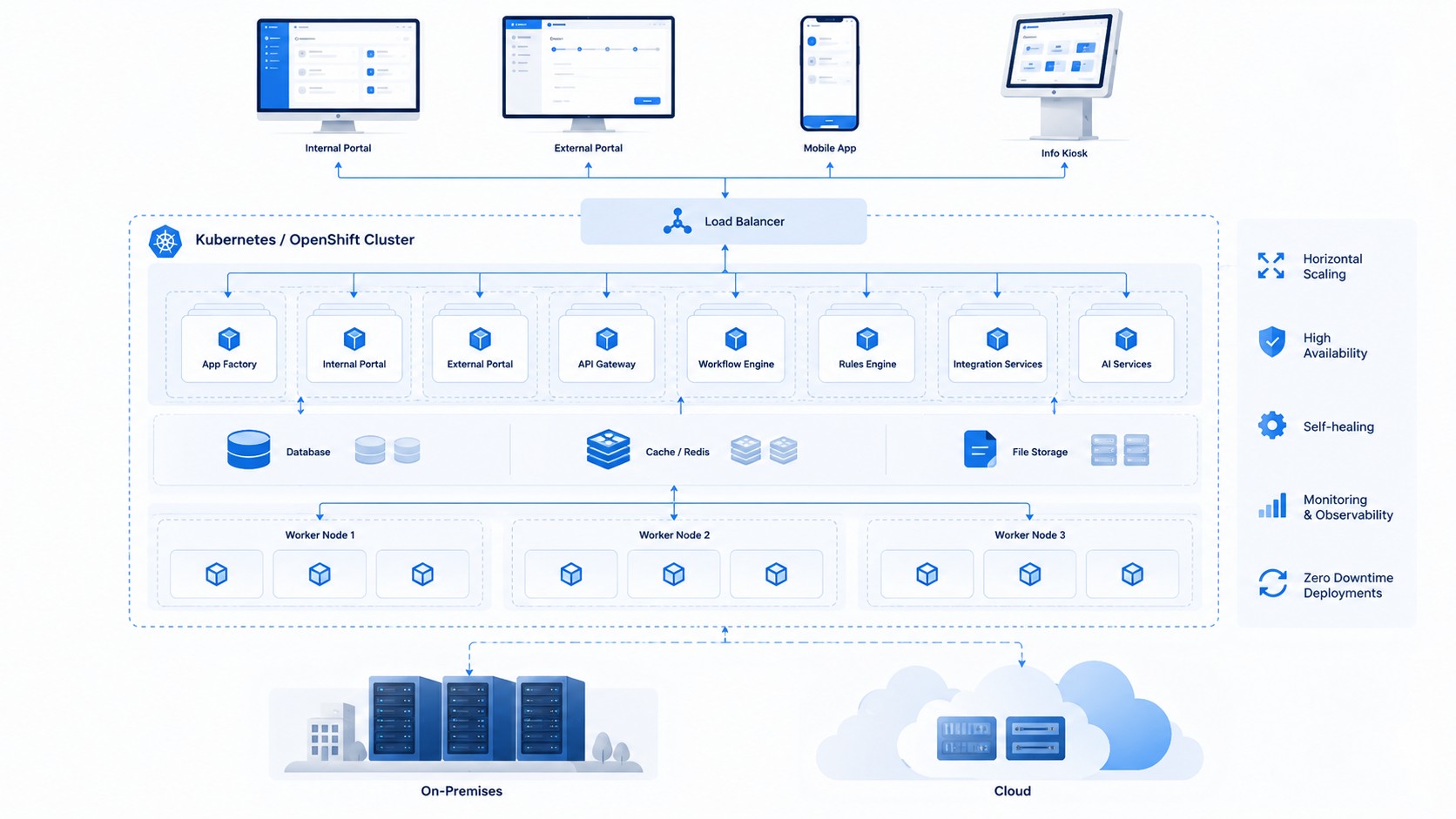
Containerized microservices on Kubernetes, OpenShift or OKD, with auto-scaling, high availability and a Redis distributed cache. On premises or in the cloud, with the same configuration.
Supported platforms
Kubernetes 1.25+, OpenShift 4.x, OKD 4.16+ (recommended), Docker Swarm.
Separate scalable services
Frontend, API Gateway and engine scale independently; Redis distributed cache; load balancing and high availability.
Hardened cluster
Network policies and RBAC in the cluster, image scanning, backup of database, files and configuration.
Administration & governance
Operate with confidence
Domains for separate applications on one installation, configuration export and import between environments, monitoring, logs, user sessions and scheduled jobs.
Domains and versions
Several applications on one installation, each with its own configuration, users and versions.
Export and import
Configuration packages moved between development, test and production from the Configuration manager.
Module tester
Start a module with test data before publishing; errors reported with the rule and parameter involved.
Monitoring and jobs
Logs, user sessions, permissions and scheduled jobs administered from one place; dashboards in Superset.
Omnichannel
One app, every channel
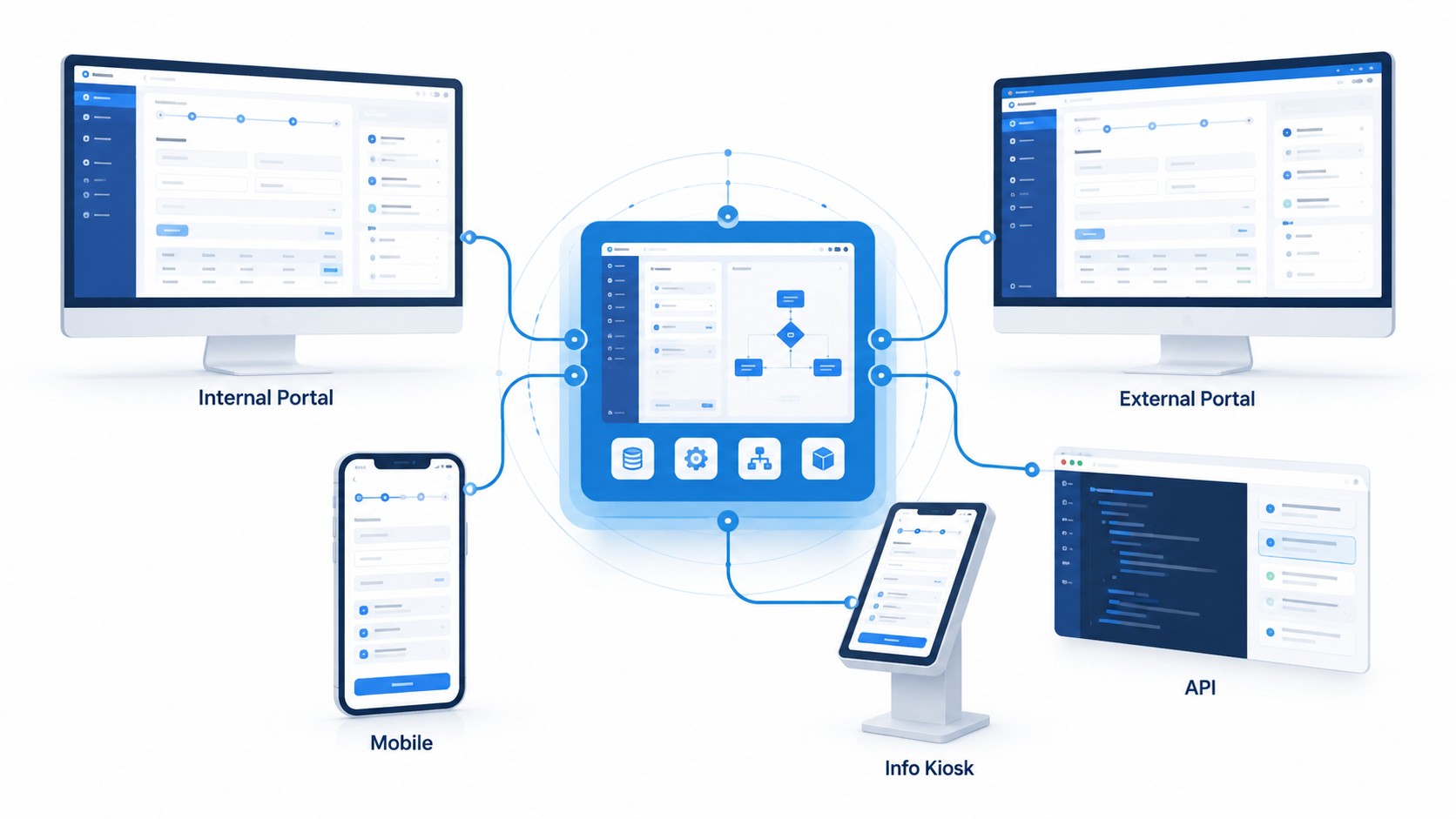
The same application on the internal portal, external portal, mobile, info kiosk and API, with responsive single-page interfaces. Data, rules, workflow and documents are configured once; each channel shows what its users need.
- Internal portal for staff, external portal for customers and citizens
- Mobile and information kiosk with the same business logic
- Public API for partner systems
Included capabilities
More tools for connected workflows
Document, communication, map and device capabilities that come with the platform and plug into any workflow, rule or screen.
Internal Smart Chat
One-to-one and group conversations with role-based access, linked directly to cases, requests and workflow items. Automatic context prefill, real-time notifications and auditable history.
Document Management
Documents created or imported from scanners, e-mail and bulk upload; approval workflows per version; unlimited metadata; full-text search including OCR text; check-in / check-out; duplicate detection by name and content; activity log on every document.
Interactive maps
Any entity with coordinates shown on the map: real-time object tracking, grouping and filtering, detailed object information, customizable layers and heat maps, alert and event visualization, geofencing.
Electronic signature
Signing with a qualified digital certificate from any workflow step; the original and the signed version are kept together, with the signature files, in the same repository.
Document compression and versioning
Lossless compression when a document is saved, delta encoding between consecutive versions to save space, versioning with automatic duplicate check and restore to any previous version.
Long-term archiving
Archiving by document type and retention period, encrypted at rest and in transit, with integration of an authorised electronic archiving service.
Scanning and OCR
Automatic OCR on images and PDFs, registration, routing or linking to a workflow during scanning, preview in the interface for all common file types.
Barcodes, QR codes and registration numbers
Printed on specialised barcode printers and applied to documents; PDF generation from templates for quotes, contracts, invoices and official replies.
Notifications and alerts
Alerts generated inside workflows, from e-mail notifications to reports generated by the system and exported in a predefined format.
Events and calendar
Events, deadlines and calendars attached to processes and entities, with reminders and escalations defined in rules.
IoT connectors, payments and POS
Control and command of IoT devices from rules and screens, live device status on the map, electronic payments and POS support.
Documentation
Everything you need to evaluate and operate the platform
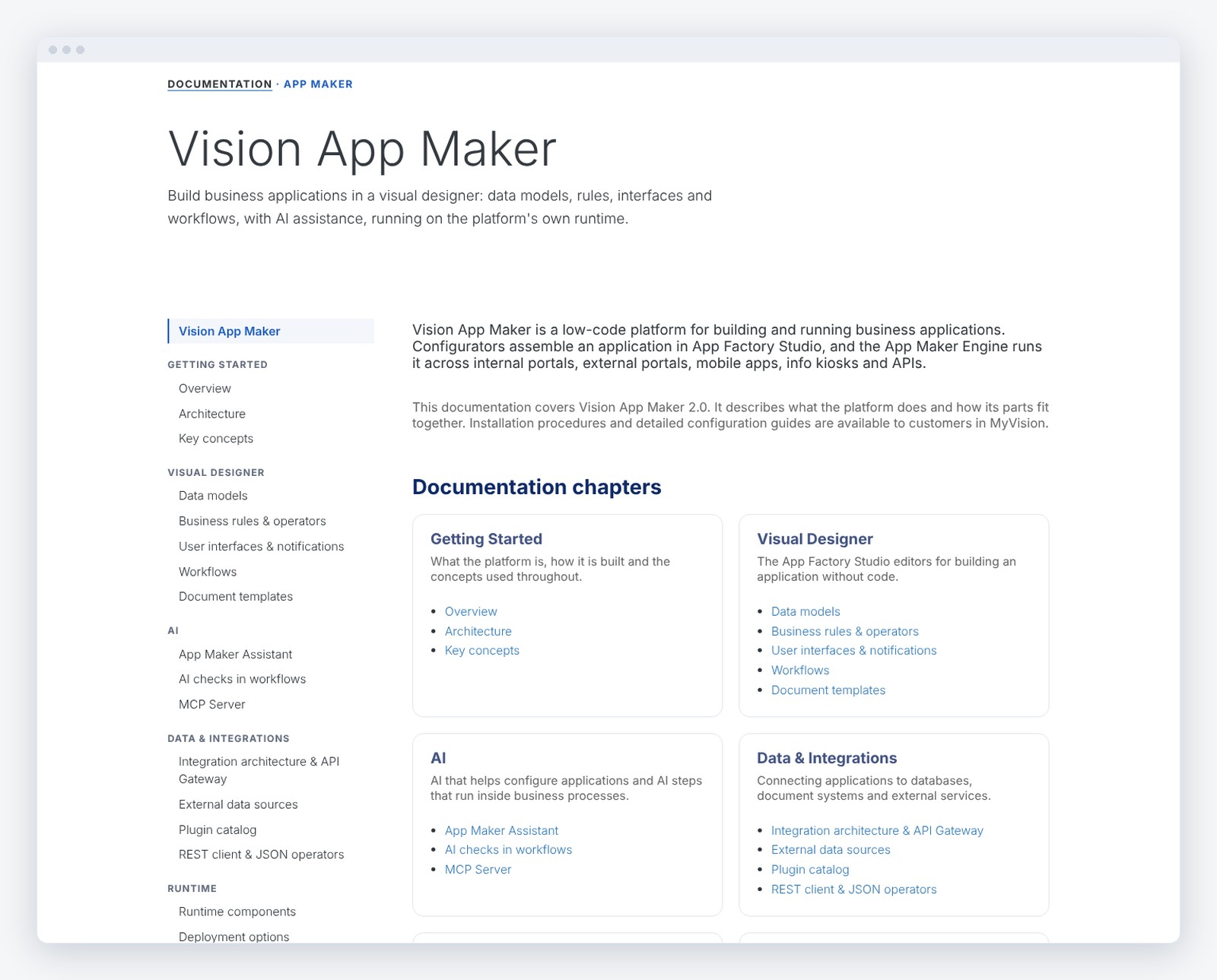
Architecture, visual designer, AI, integrations, security, deployment and administration, in one public documentation site, in English and Romanian.

- Easy build new application from scratch or Integrate legacy systems into unified application
- Digitalize your business workflows through business processes re-engineering
- Drive innovation by quickly creating innovative digital products and services

- Data Model Graphic Designer
- Business Rules
- Interface Visual Editor
- Workflow Visual Editor
- Powerful Integration Capabilities
- Omnichannel

Accelerate application development with our low-code platform, enabling teams to quickly build, deploy, and scale custom apps with minimal coding. Empower your business with intuitive drag-and-drop tools, seamless integration, and faster time-to-market—all without compromising on functionality or flexibility.

Vision App Maker now includes a conversational AI co-pilot, built directly into the integrated administration and configuration studio. You describe a requirement in plain language and the co-pilot helps you configure the entire application: the data model, the interfaces, the processes and the business rules.
The co-pilot is context-aware — it reads the configuration in front of you and uses semantic search across your existing configuration. Every proposal is validated syntactically and checked against the execution engine before it reaches you, and nothing is written automatically: you review and accept every change.

Streamline and automate your business operations with our BPM platform. Designed to optimize workflows, improve efficiency, and enhance collaboration, our platform offers powerful tools for modeling, monitoring, and managing processes, enabling faster decision-making and greater productivity across your organization.

AI orchestration, enabling intelligent steps inside traditional workflows.
Define process sequences executed by AI agents, combine multiple AI models, and control how intelligence is applied—fully automated or with human validation—directly from the no-code BPM designer. AI Flow transforms workflows from static execution into adaptive, context-aware processes.

- Documents electronic signature and generation
- Two-factor and 3rd party authentication
- Single sign on
- IoT connectors
- GIS and heat maps
- Electronic payments and POS support

Internal Smart Chat is an advanced, natively integrated communication feature within Vision App Maker, designed to enable real-time collaboration across digital administrative workflows. It supports one-to-one and group conversations, role-based secure access, and direct integration with cases, requests, and workflow items. With automatic context prefill, real-time notifications, and auditable conversation history, the chat streamlines communication and improves operational efficiency and transparency.

- Document creation or insertion of files and images via scanners, email, bulk import, etc
- Approval workflows for the current version of the document
- Unlimited use of metadata fields (descriptors) for classification and search
- Full-text indexing and searching, including text extracted from scanned documents via OCR
- Drag-and-drop upload of electronic documents
- Duplicate file detection mechanisms

- Real-time object tracking
- Objects grouping and filtering
- Detailed object information
- Customizable map layers
- Alert and event visualization
- Geofencing

Intelligent sequences are designed and managed through an interactive, graph-based visual interface. Users can connect components, inspect logic paths, and understand execution flows at a glance. The visual model improves collaboration between technical and business teams. Even complex intelligence pipelines remain accessible and easy to evolve.

Once defined, intelligent sequences become executable parts of live business processes. They can be triggered by events, user interactions, system calls, or data changes. This ensures that intelligent decisions are applied exactly when needed, in real time. The result is a seamless transition from intelligent logic to measurable business outcomes.
Visual and intuitive editor: flows can be simple or complex, from procurement approval to credit management or back-office solutions.
Definition of simple and complex data types, cardinalities, lists, parameters and entities for any type of application in visual designer.
A visual rules engine that any user who can write formulas in Excel can configure. Implement scoring, escalation and notifications, or control how information is displayed and processed in the interface, documents and reports.
Generate responsive UI accessible from any web browser or mobile device. Build Single Page Applications providing a fluid, desktop-like user experience.
Allows integration with any system through a plugin mechanism. Data can be imported from ERP, CRM, DMS or legacy systems and can be further used in workflows, rules, interfaces and document templates.
Same user experience across all channels: Internal Portal – External Portal – Mobile – Info kiosk – API


| Attachment | Size |
|---|---|
| Discover the technology | 6.32 MB |