Data models define the information that an App Maker application stores and processes. Configurators build them in the Data menu of App Factory Studio without writing SQL. Rules, workflows, interfaces and document templates then use them.
The Data menu
The Data menu groups four kinds of objects, each with a list and an Add action:
- Parameters: variables of a module or process;
- Custom types: complex data structures with attributes;
- Entities: data entities with attributes;
- Lists of values: key-value lists for selections.
Custom types
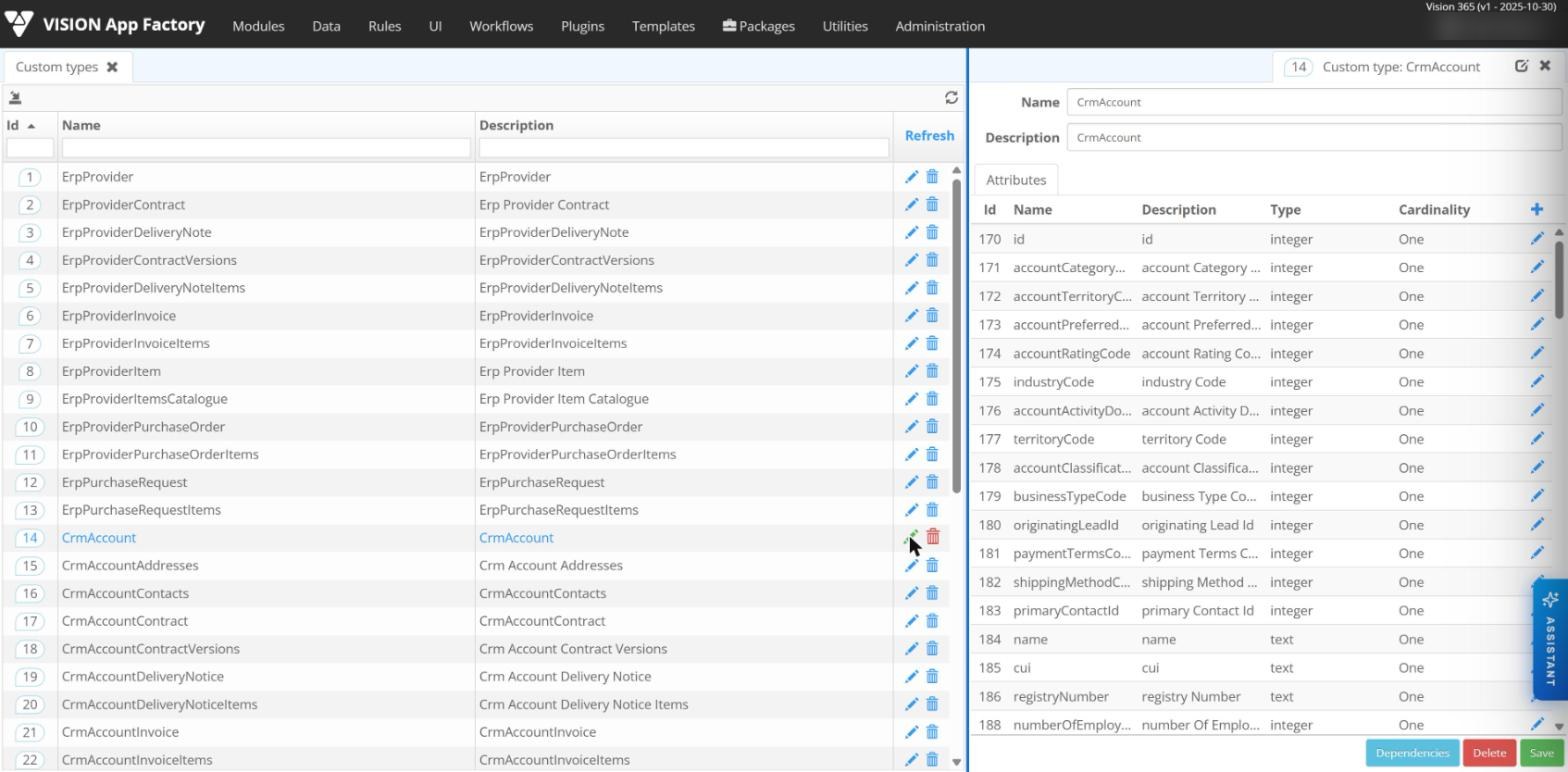
A custom type describes a record, such as a customer, a request or an invoice. It has a name, a description, a table of attributes and a Dependencies section.
Each attribute has a name, a description, a data type and a cardinality. Supported data types are integer, text, decimal, date, boolean, big integer, big decimal, custom type, process and anything. Cardinality is One for a single value or Zero or more for a list of items.
An attribute whose type is another custom type creates a nested structure. Combined with the Zero or more cardinality, it holds a list of nested records.
Binding a custom type to a table
A custom type may or may not be linked to a database table. To link it, the type has the same name as the table and its attributes match the table's columns. Each attribute stored in the table is marked as persistent.
Attribute behaviours
Each attribute of a custom type can have its own behaviour, which sets how it gets its value at runtime.
| Behaviour | What it does |
|---|---|
| Static | Takes a predefined value that stays the same during execution. |
| Dynamic | Takes a value calculated at runtime. |
| ListOfValues | Loads a key-value list. |
| DefaultValue | Takes a predefined value that can change during execution. |
| Validator | Shows a validation message when a condition is met. |
The value or condition comes from a business rule, a parameter, a connector (API) or a constant. A validator can therefore check an attribute against its own content, other attributes or data from an external system.
Parameters
A parameter is a variable used by modules and processes. For an order process, the order value is a parameter. Parameters can have a simple data type or a complex one: a custom type or anything.
- Parameters are defined once in the domain and bound to each module that uses them.
- A custom type becomes available in a module through a parameter of that type.
- When Persistent is checked, the parameter's value is saved in the module instance.
- Parameter behaviours are Static, Dynamic, Volatile, ViewScoped, ListOfValues and DefaultValue. Static, Dynamic, ListOfValues and DefaultValue work as described above.
Lists of values
A list of values supplies the options for a parameter, an attribute or a drop-down field. Its data type can be integer, decimal, text, boolean, date, big decimal or big integer.
Each item is a key-value pair. The labels shown to users are resources defined separately for each language. Each item can also have a display condition. A list can then show all its items in one context and only some of them in another.
Entities
An entity has a name, a description, an "is system" flag, a "has identity" flag and a list of attributes. Entities are defined in App Factory Studio and have no direct binding to external data sources. Data from other systems reaches the model through plugins, described below.
Working with data
In business rules
Rules read and write data with dedicated operators:
ReadEntityreads one record or a list of records, with an optional filter expression;SaveEntitysaves a record or a list of records, optionally only selected fields;DeleteEntitydeletes a record, or the records that match a filter;CreateandCreateListbuild custom type values from arrays;ToJsonconverts a custom type value to JSON.
In forms and processes
Data model elements are bound visually to interface fields. Data entered in forms is saved into the structure of the model, and data from the model can pre-fill a process.
External data
Plugins connect the data model to other systems. A SQL plugin instance, for example, can query an external ERP database live to read a supplier code. Fields can also take their values from third-party APIs:
- on demand: when a page is opened, the platform calls the external API, shows the data and updates its own storage;
- polling: a scheduled task checks the external API at a set interval and updates the local fields.
Import and export
Plugins read data from Excel files into custom types and write lists of custom type values to Excel files, with optional column formatting. Data can also be imported from CSV files and exported manually or on a schedule.
Validation, access and audit
- Validation rules at field level, such as a valid e-mail address or a mandatory value.
- Permissions on data for viewing, editing and deleting, by role, team or process context.
- Audit of changes on selected data entities, with who created or changed a record and when.