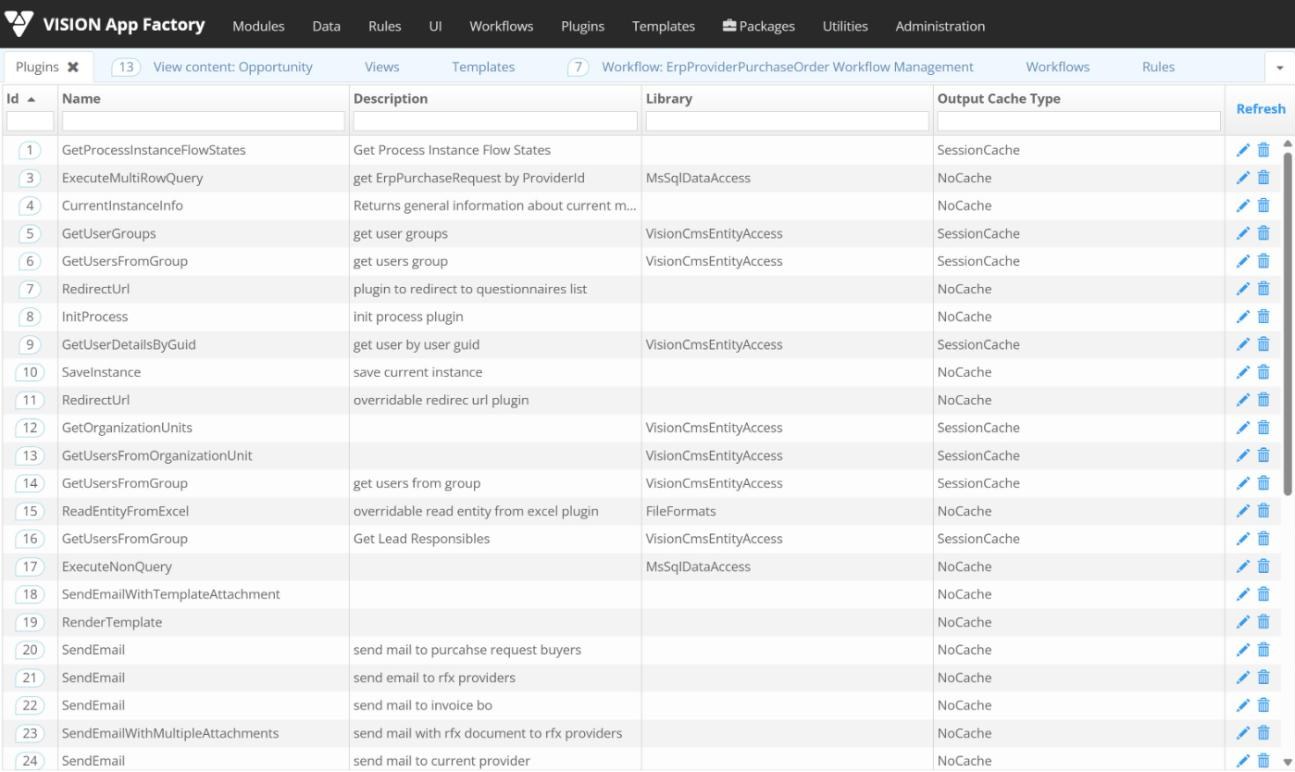
Plugins give Vision App Maker rules access to portal data, databases, files, documents, signatures and third-party systems. Each library groups the methods for one area. This page lists the methods described in the App Factory Studio documentation.
Configured plugin instances with library and output cache type.
Using a plugin
A configurator creates a plugin instance in App Factory Studio for one method. The instance has a name, an output cache type (NoCache or SessionCache), inputs and indexed outputs. A rule runs it with CallPlugin(id) when all inputs are bound, or with CallPluginWithParams to pass inputs at run time.
Portal entities
Method
What it does
CreateCmsUser
Creates a portal user if no user has the same e-mail or user name; returns the new user id
UpdateCmsUser
Updates a portal user, either all properties or only those provided
GetUsersFromGroup
Returns the users assigned to at least one of the given groups
GetUsersFromOrganizationUnit
Returns the users of an organizational unit
GetUserDetails
Returns a user's details (contact data, direct manager, unit, job title, stamp) by user name
GetUserDetailsByGuid
Returns the same details by user GUID
GetUserDetailsById
Returns the same details by user id
GetUserGroups
Returns all user groups
GetOrganizationUnits
Returns all organizational units
CreateOrganizationUnit
Creates an organizational unit with description, parent unit and manager
UpdateOrganizationUnit
Changes the name, parent, manager or description of a unit
ClearOrganizationUnitUsers
Removes all user links from an organizational unit
SQL Server
Method
What it does
ExecuteMultiRowQuery
Runs a parameterized SQL script and returns several rows
ExecuteSingleRowQuery
Runs a query and returns one row
ExecuteNonRowQuery
Runs a statement without a result, typically insert, update or delete
ExecuteMultiRowQueryProcedure
Runs a stored procedure and returns a list of rows
ExecuteSingleRowQueryProcedure
Runs a stored procedure and returns one row
ExecuteNonRowQueryProcedure
Runs a stored procedure without a result
System
Process instances
Method
What it does
CurrentInstanceInfo
Returns the current process instance: ids, module, state, activity, user, role, language, dates
SaveInstanceInfo
Saves the process instance when it moves from one state to another
InitProcess
Starts a new process instance of a module
LoadProcess
Loads an existing process instance
ReadParameters
Reads parameter values from a module session
SetParameters
Sets parameter values in a module session
SearchInstances
Searches process instances by id, module, domain, states or identifier
GetProcessInstanceFlowStates
Returns the states of a module
GetFlowStatesLog
Returns the state history of the current process: user, date, state, activity, comments
RedirectUrl
Redirects the user to a given URL
Notifications
Method
What it does
SendEmail
Sends an HTML or text e-mail, with priority and optional asynchronous sending
SendEmailWithAttachment
Sends an e-mail with one attached file
SendEmailWithMultipleAttachments
Sends an e-mail with a list of attachments
SendEmailWithTemplateAttachment
Sends an e-mail with a document template as attachment
SendEmailWithTemplateBody
Sends an e-mail whose body is a template
SendMeeting
Sends a meeting invitation with start and end dates
GenerateMessage
Generates an info, warning or error message
Files, templates and Excel
Method
What it does
RenderTemplate
Renders a document template, typically for download
AddPdfWatermark
Adds an HTML watermark to a PDF at a given position and size
PackFileInArchive
Packs several files into an archive
SaveFile
Saves a file, optionally overwriting an existing one
SaveTextFile
Writes or appends text to a file, in Unicode or UTF-8
ReadFile
Reads a file
ReadEntityFromExcel
Reads an Excel sheet into a custom type, with column mapping
WriteEntityToExcel
Writes a list of custom type values to an Excel file
WriteEntityToFormattedExcel
Writes custom type values to Excel with a style defined in JSON
WriteMatrixDataToFormattedExcel
Writes a matrix of values to Excel with JSON column formatting
Logic and HTTP
Method
What it does
ExecuteJS
Executes JavaScript code
ExecuteRule
Executes business rule text
GenerateBasicAuthToken
Generates an authentication token from a user name and password
MakeHttpCall
Makes an HTTP call with URL, method, JSON body and headers; returns the response
GetDictionaryFromJson
Converts JSON text into a dictionary
Document management systems
Library
Method
What it does
SharePoint
ReadMultipleEntities
Reads list items, with selected columns and filters
SharePoint
ReadEntity
Reads one list item by id
SharePoint
CreateEntity
Creates a list item
SharePoint
UpdateEntity
Updates a list item
SharePoint
DeleteEntity
Deletes a list item
SharePoint
UploadFile
Uploads a file with metadata to a document library
SharePoint
ListFilesInFolder
Lists the files in a library folder
SharePoint
DownloadFile
Returns a file's name and content
SharePoint
DeleteFile
Deletes a file from a library
Alfresco
ListFilesInFolder
Lists the contents of a folder
Alfresco
DownloadFile
Downloads a file from the repository
Alfresco
UploadFile
Uploads a file to a folder
Alfresco
MoveFile
Moves a file to another folder
Alfresco
DeleteFile
Deletes a file from the repository
Alfresco
SaveFolder
Updates a folder or creates it if missing
Alfresco
ReadUsersInfo
Returns the users of a site
Alfresco
ReadGroupInfo
Returns the user groups of a site
Alfresco
GetUsersEmailsFromGroups
Returns the e-mail addresses of a group's users
Liferay
CreateFolderWithGivenPath
Creates a folder at a given path
Liferay
ListFilesInFolder
Lists the contents of a folder
Liferay
UploadFile
Uploads a file with title, description and change log
Liferay
MoveFileToGivenPath
Moves a file to another folder
Liferay
DeleteFile
Deletes a file from the Liferay library
Business applications
Library
Method
What it does
Microsoft Dynamics CRM
ReadMultipleEntities
Reads records of an entity with filters; the Web API variant adds ordering and paging
Microsoft Dynamics CRM
ReadEntity
Reads one record by GUID
Microsoft Dynamics CRM
SaveEntity
Saves a record
Microsoft Dynamics CRM
DeleteEntity
Deletes a record by GUID
Microsoft Dynamics CRM
GetOptionSetValues
Returns the values of an option set field
Microsoft Dynamics CRM
SetEntityState
Sets the state code and status code of a record
QuickBooks
GetCustomersList
Reads customers into an App Maker entity
QuickBooks
GetInvoicesList
Reads invoices into an App Maker entity
QuickBooks
GetItemsList
Reads items into an App Maker entity
QuickBooks
CreateCustomer
Creates a customer and returns the updated instance
QuickBooks
CreateInvoice
Creates an invoice and returns the updated instance
QuickBooks
GetNewAccessToken
Generates a new access token from a refresh token
ReadEntity, ReadMultipleEntities, SaveEntity and GetOptionSetValues also exist in a second set that calls the Dynamics CRM Web API. A connector for the Avantax local tax platform reads nomenclatures, taxpayer data and amounts due, saves declarations, records payments and issues reports.
Documents
Method
What it does
AddExtraPageToPdf
Adds a blank page to a PDF
AddCommentToPdf
Adds a comment at a position on a PDF page
AddStampToPDF
Adds a stamp image with number and date
AddStampAsTextToPdf
Adds a text stamp with registration and approver details
AddQRCodeToPdf
Adds a QR code with given text at a position
GetPdfPageNumber
Returns the number of pages of a PDF
StringToByteArray
Converts text into a file
ByteArrayToString
Converts a file into text
Digital signature
Method
What it does
GetEmptySignatureHashedFile
Prepares a PDF with an empty signature field and returns its hash
ReplaceEmptySignature
Replaces the empty field with the user's signature
GetSignaturesFromByteArrayDocument
Returns the number and list of signatures in a file
CheckCertificate
Checks the status of a Trans Sped cloud signing certificate
SendOTPBySMS
Sends a one-time password by SMS to the certificate holder
SignDocument
Signs a PDF with a Trans Sped cloud certificate
STSSignDocument
Prepares a document for signing with another cloud signing service
SignedBytes
Retrieves the file signed through that service
Other
Method
What it does
Upload
Uploads a document with its archival metadata to an authorized electronic archive