Vision App Maker is administered from two places: the internal portal and App Factory Studio. The internal portal manages users, content, security and portal behavior. App Factory Studio manages application domains, configurators and configuration versions.
Standard administration features
The internal portal includes five groups of standard features. They are not available in the external portal.
| Feature | What it covers |
|---|---|
| User profile | Identification and contact data, organizational membership, roles and groups, tools used (such as the digital signature), language. Data taken from an external authentication system may be read-only. |
| Visual theme | Interface changes in real time and one or more themes; three themes are delivered: Light, Dark and Sapphire |
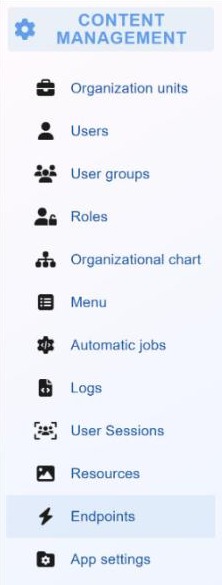
| Content management | Organizational units, org chart, menus, automated jobs and logs |
| Security and access | Built-in user and access management, or integration with systems such as Active Directory or Keycloak |
| Work tools configuration | Real-time status of the local token through Vision Desktop Experience, and updates of that application |
Content management area
Administrators of the internal portal work in the content management menu. Access to each screen is controlled by roles and permissions.
- Organizational units and org chart: the structure of the organization and the hierarchy of users.
- Users, user groups and roles: accounts, group membership and the access each role grants.
- Menu: the organization of portal menus.
- Automated jobs: recurring and scheduled background tasks.
- Logs and user sessions: activity records and current access.
- Resources: files and other resources used in the portal; they also support a multilingual interface.
- Endpoints: published REST endpoints, API clients and MCP tools.
- Application settings: security settings and general behavior settings.
The portal also offers standard CMS features: static pages (views), menus and resources. Dynamic content comes from the applications configured in App Factory Studio.
Authentication and user synchronization
The authentication method is set in the portal's Configuration Manager, or through the platform's environment settings. For Active Directory, the administrator sets:
- the connection data for the directory;
- whether directory groups are imported, or the directory is used only for authentication;
- the organizational units where users are located (several are supported);
- the mapping between directory groups and App Maker groups.
Keycloak is configured in a similar way. Directory users are added at their first successful sign-in, or imported in bulk from the Users screen.
General behavior settings
Operating variables control how the portal behaves. They are edited in the settings interface or in the files that store them.
- maximum number of concurrent users and an optional waiting queue;
- portal capacity, with monitoring of active and waiting users;
- inactivity timeout in minutes, after which users are signed out;
- upload and download limits;
- session validity;
- cache timeouts and other operational variables.
App Factory Studio administration
The Administration menu of App Factory Studio manages access to configuration work.
| Screen | Purpose |
|---|---|
| Administration users | Users with configurator rights |
| Domains | The domains that group applications |
| Permissions | Permissions assigned to one or more roles and placed on workflow transitions |
| Users and Roles | Users and the roles that grant access to menus and features |
| Cultures | Languages and localization settings |
| About | Platform version and change history |
A permission on a workflow transition limits access to the next activity. Only users with that permission can open the activity.
Application domains
Each application built in the platform has its own domain. A domain has a name and a data connection to the business database that the application uses. A domain can have several versions, and the administrator grants access to the configurators who build the application.
Configuration export and import
The Configuration Manager in App Factory Studio moves a domain's configuration between environments.
- Select the domain and export its configuration. The export appears in a list and can be downloaded as a file.
- Use the file as a backup, or send it for deployment.
- In the target environment, import the file with its version identifier.
- Refresh the configuration to apply the imported changes.
Utilities
- Module tester: simulates a module. The Viewer tab shows the interface and runs actions as a user would. The Rule tester tab tests and debugs rules and checks parameters.
- Module exporter: exports or imports a single module.
- Configuration manager: exports and imports the full configuration of a domain.