Agentic processing of supplier invoices on Vision 365, from RO e-Factura to approval and payment, checked against the approved budget
A real estate company moves its supplier invoice approval into Vision 365 Enterprise Performance, next to its budget. AI agents read every invoice from RO e-Factura, recognise the supplier, contract and budget line, and prepare the decision. A rules engine approves automatically the invoices that match a pre-authorised, budgeted expense. People decide only where a confirmation, an authority level or a budget exception requires them.
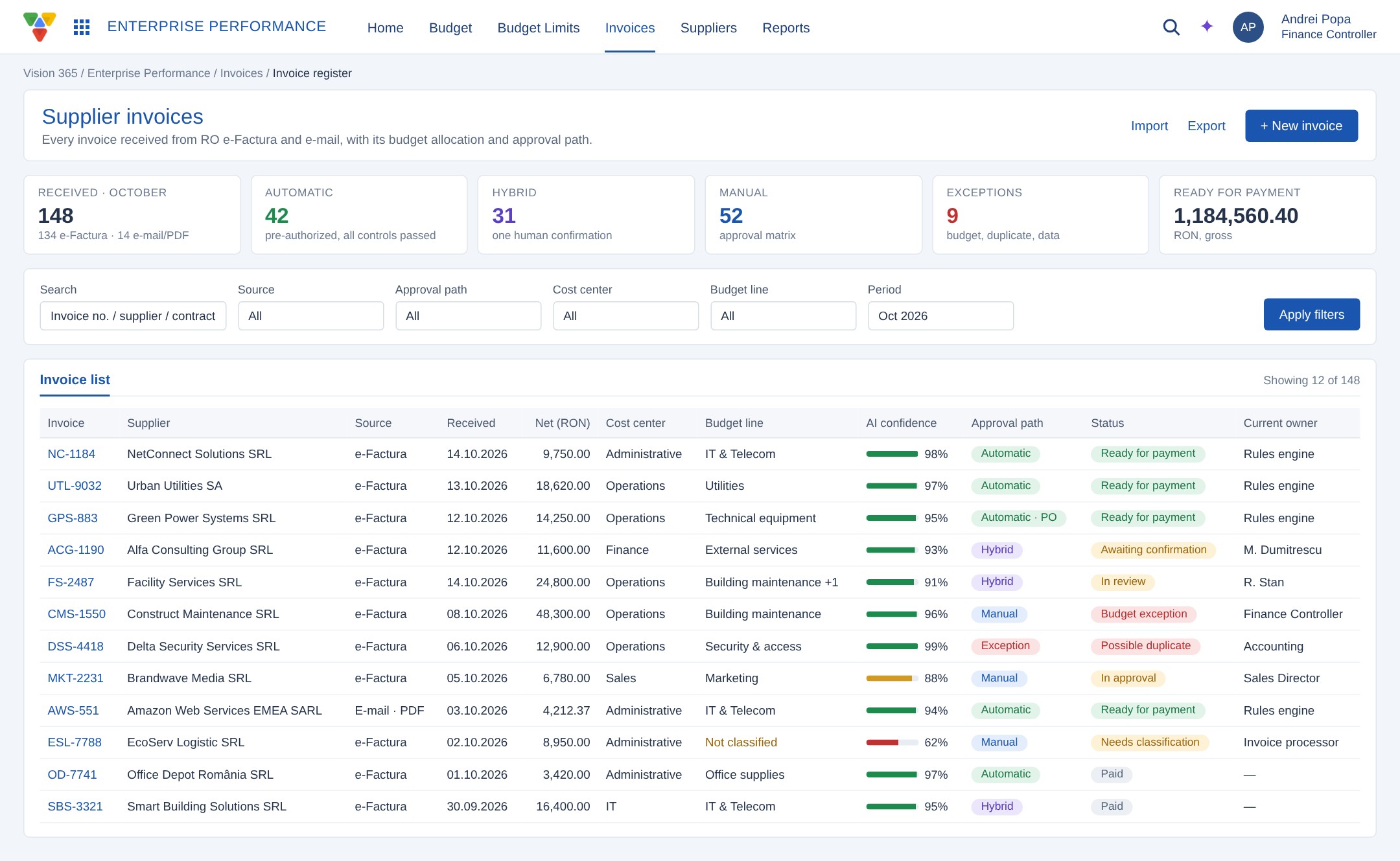
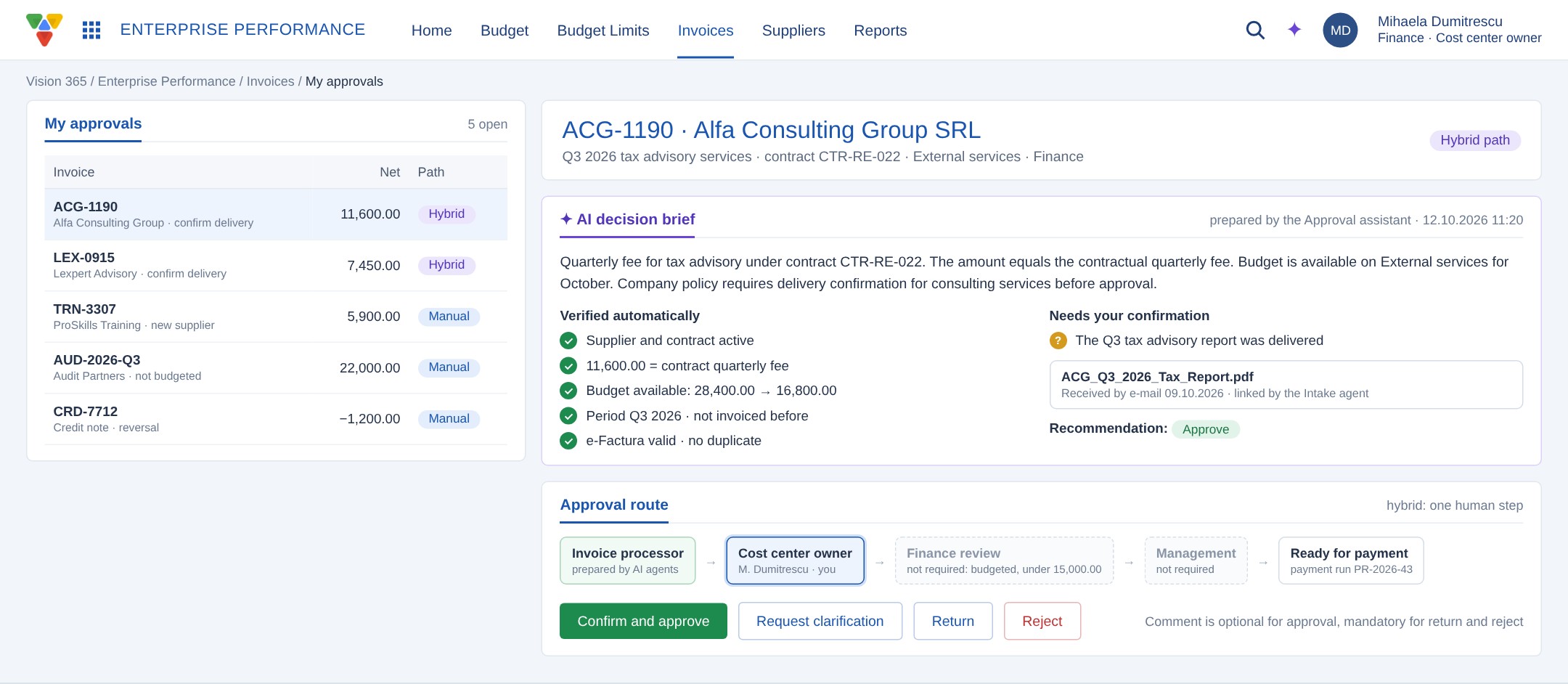
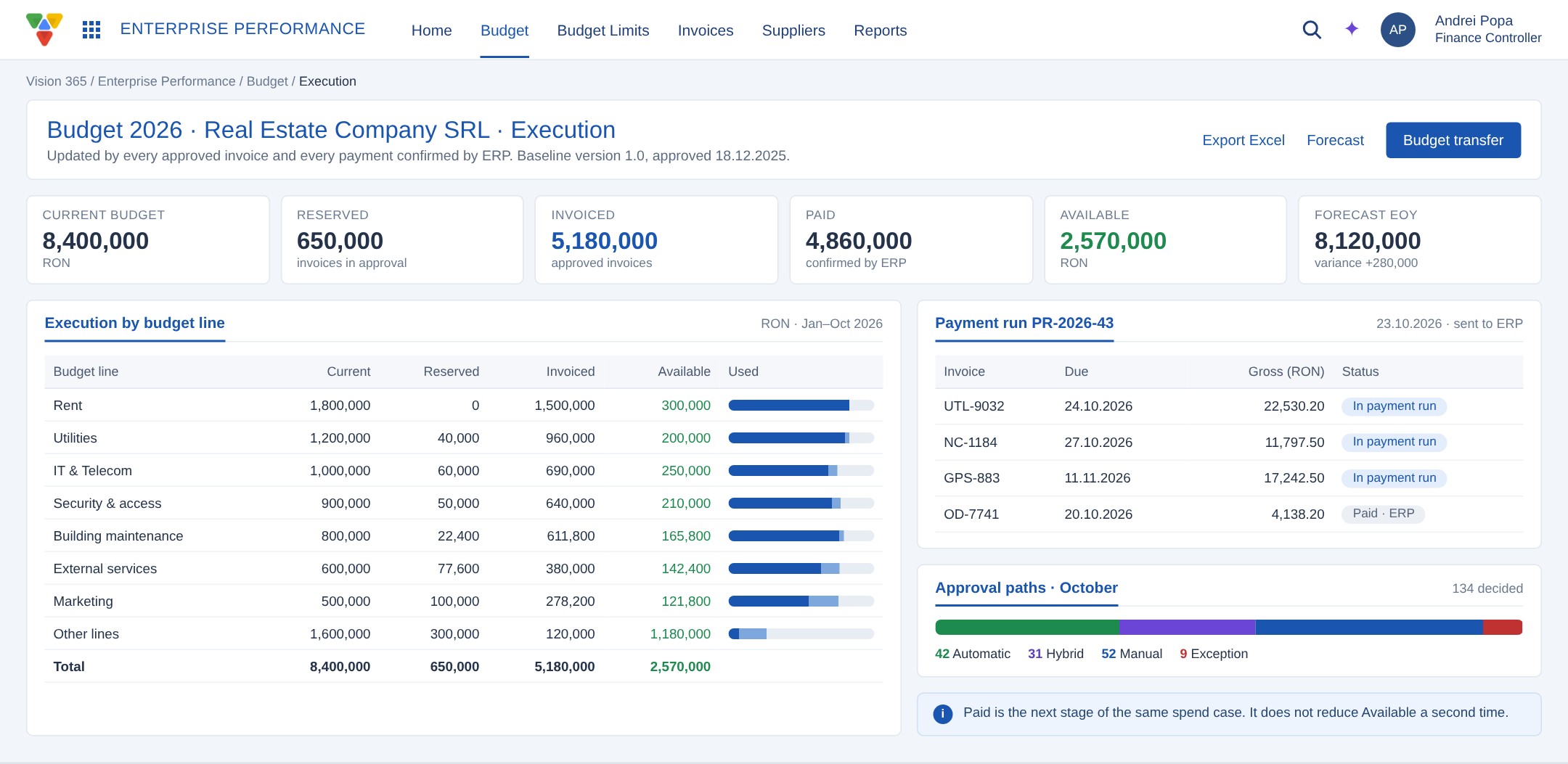
The company runs its supplier invoice approval in a Vision application built on the same low-code platform as Vision 365. Invoices carry the supplier, number, due date, net and VAT values, project, contract, purchase order and budget code, and move through an approval circuit with roles such as expense owner, line manager, accounting, credit control and CFO/CEO.
The annual budget is prepared in an Excel workbook, with CAPEX and OPEX sheets for each area: property and technical, IT&C, security, concierge, quality, sales, marketing and administration. The company wanted budget control inside the approval process and wanted to stop sending routine, already approved spending through the full circuit every month.
Initial Challenges
Budget and invoices lived in separate places. Actual spending was typed into the workbook by hand, so it was late and had no link to the invoice behind it. The budget field on an invoice could not be traced to a specific budget line and month.
Every invoice followed the same multi-step chain, whether it was the twelfth monthly IT subscription under a signed contract or an unplanned repair. Budget overruns were noticed after approval, and the workbook could not tell apart money that was reserved, invoiced or already paid.
The Smart Solution
The existing approval application is upgraded in place with three Vision 365 modules: Budget Management, Providers (minimal) and Invoice Management & Approval. The current circuit stays as the functional base. On top of it, Vision 365 adds budget allocation per invoice line, pre-authorisation of known expenses, an AI agent layer and a rules engine that chooses the approval path for each invoice.
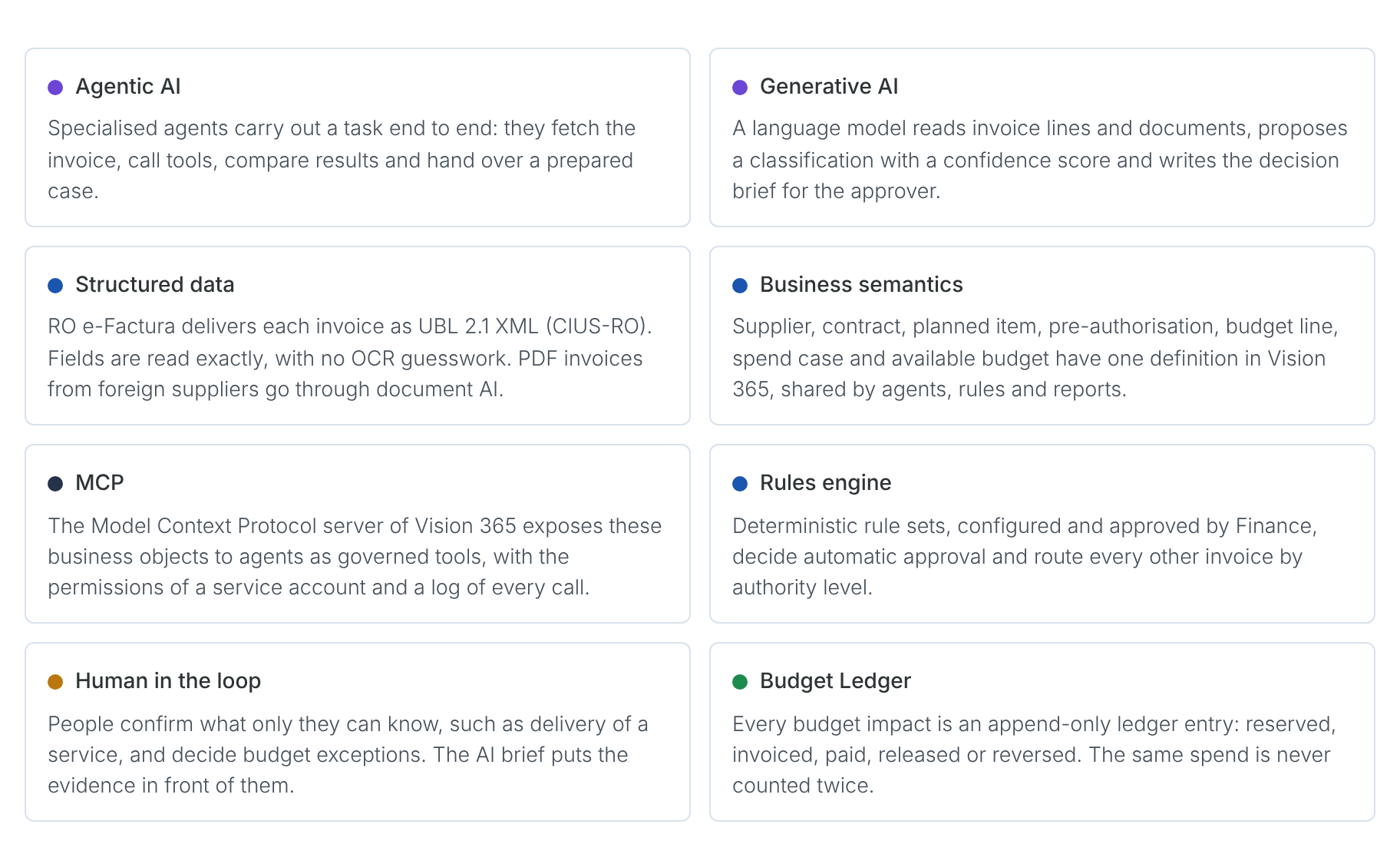
Key concepts
End-to-end flow
Seven steps take an invoice from receipt to payment. Each step shows who acts on it: AI agents propose and prepare, rules check and decide, people confirm and approve, ERP pays.
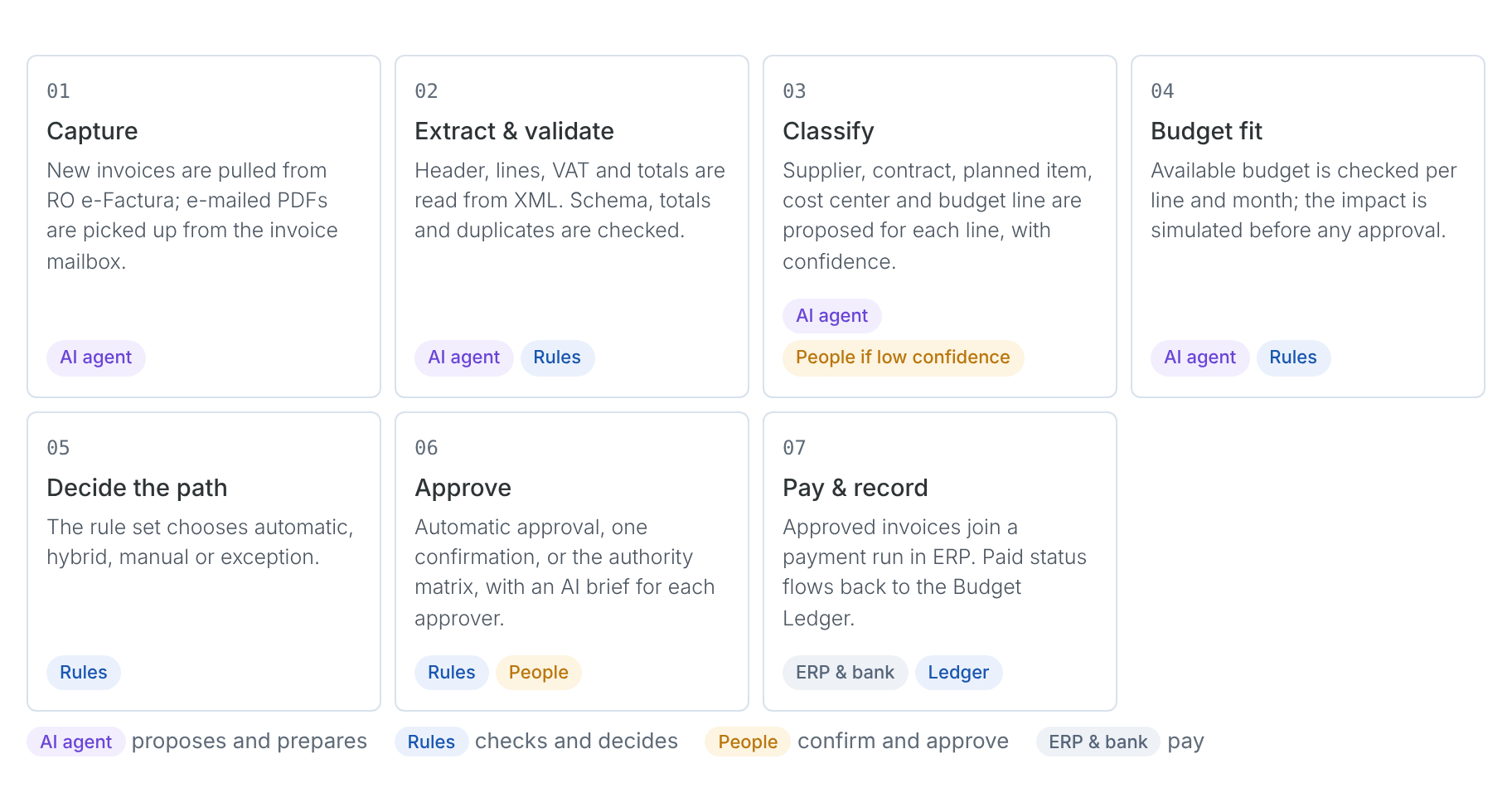
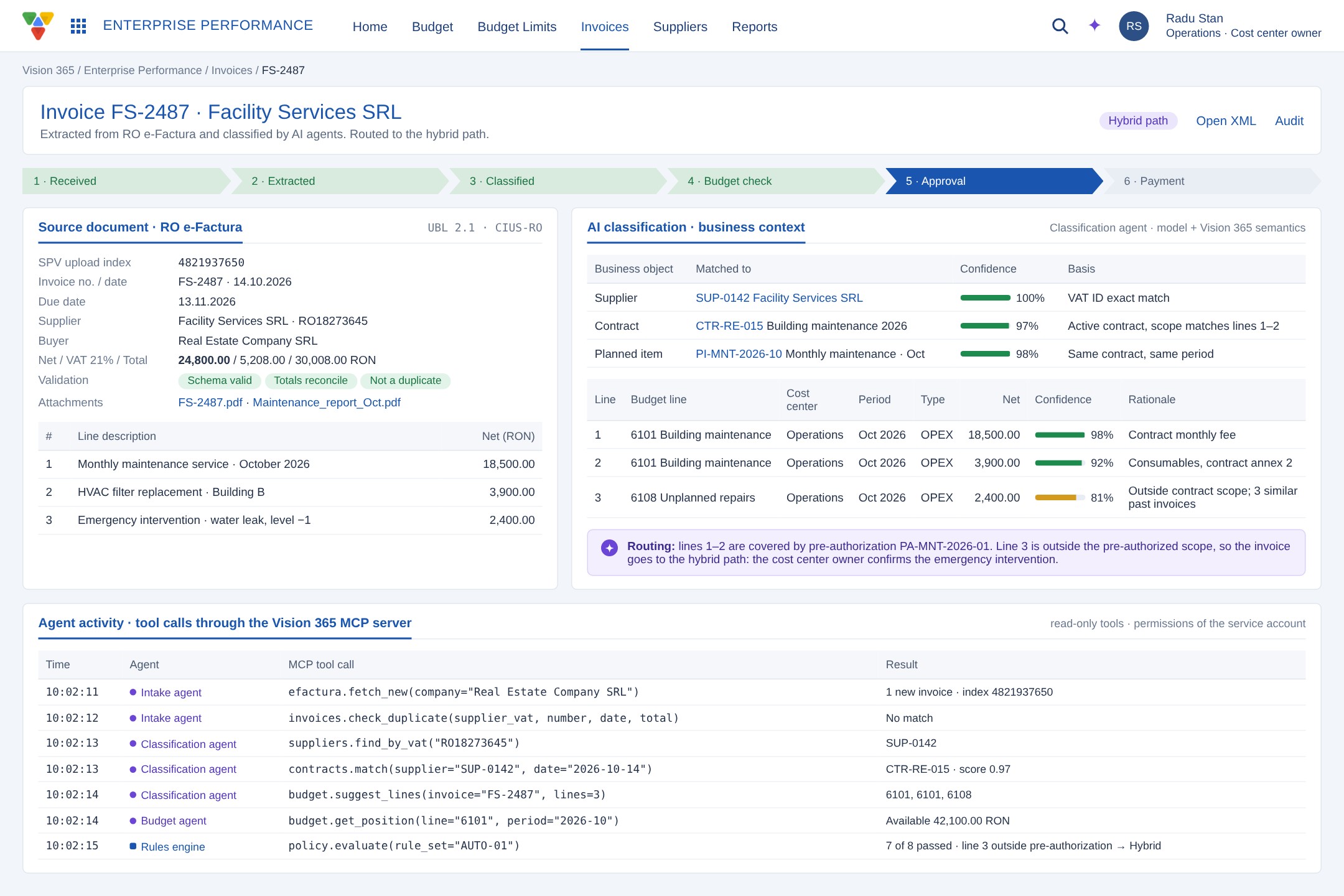
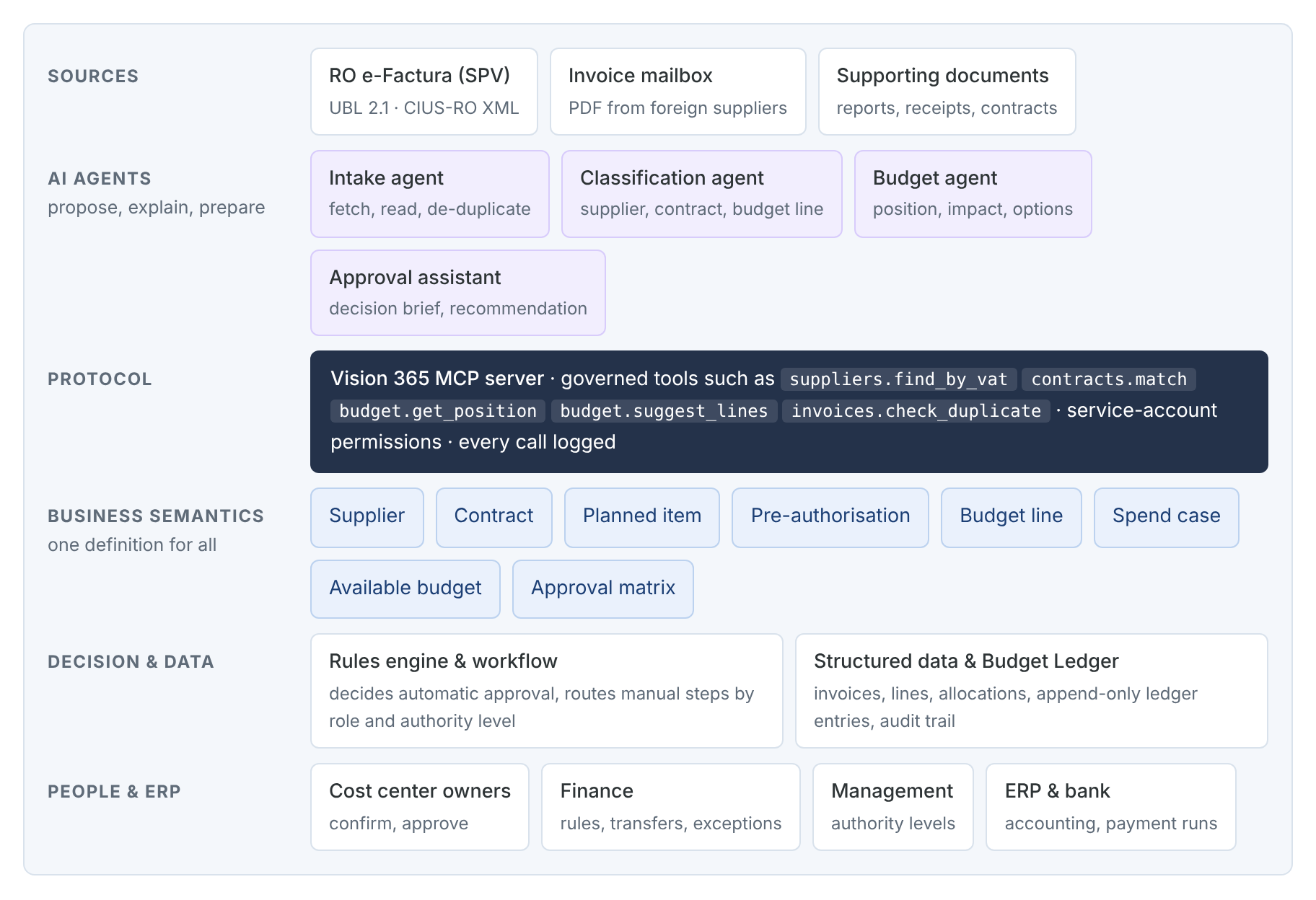
- Capture, extraction and validation. The Intake agent checks RO e-Factura for new invoices and reads each UBL XML file, so supplier VAT ID, number, dates, lines, VAT and totals are taken exactly. Invoices received by e-mail, such as those from foreign cloud providers, are read with document AI. Vision 365 checks the schema, reconciles totals and looks for duplicates before anything else.
- Classification. The Classification agent matches the invoice to Vision 365 business objects through the MCP server: supplier by VAT ID, active contract, planned item for the period and a budget line for each invoice line, each with a confidence score and a short rationale. Lines below the confidence threshold are classified by a person.
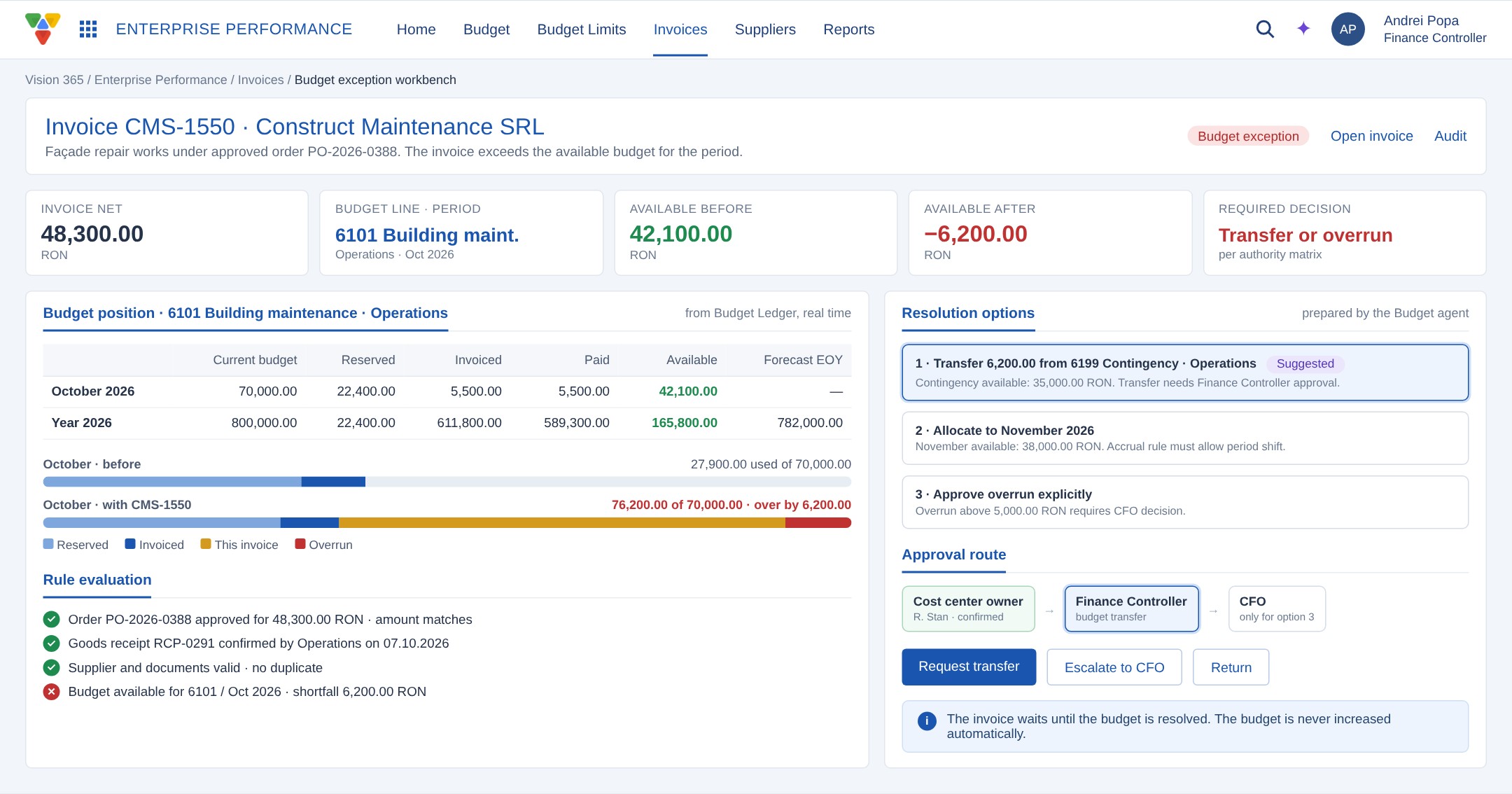
- Budget fit. The Budget agent reads the position of each budget line for the invoice month (current budget, reserved, invoiced, paid, available) and Vision 365 simulates the impact before approval. When an invoice exceeds the available amount, the agent prepares resolution options, such as a transfer from the contingency line. The budget is never increased automatically.
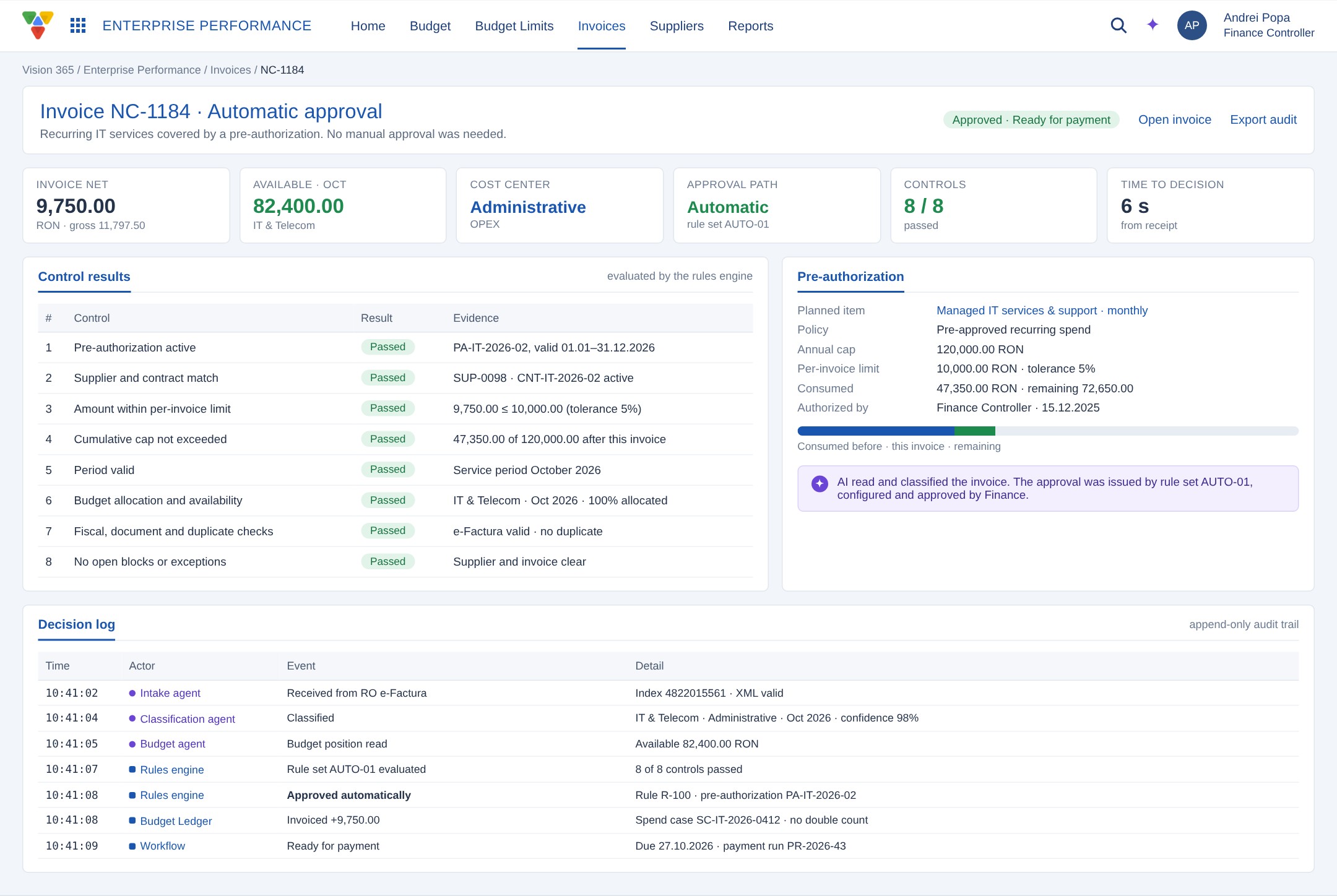
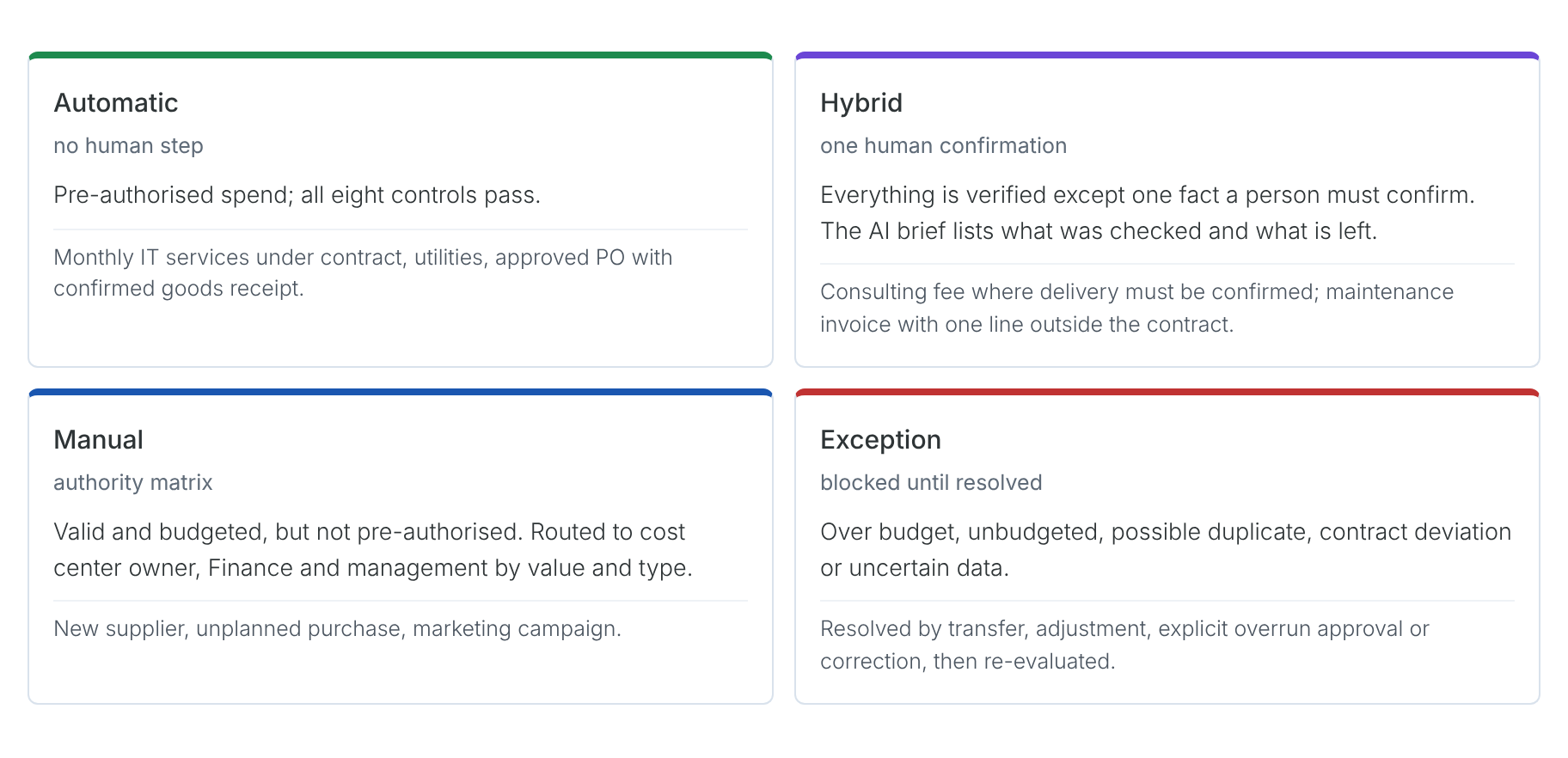
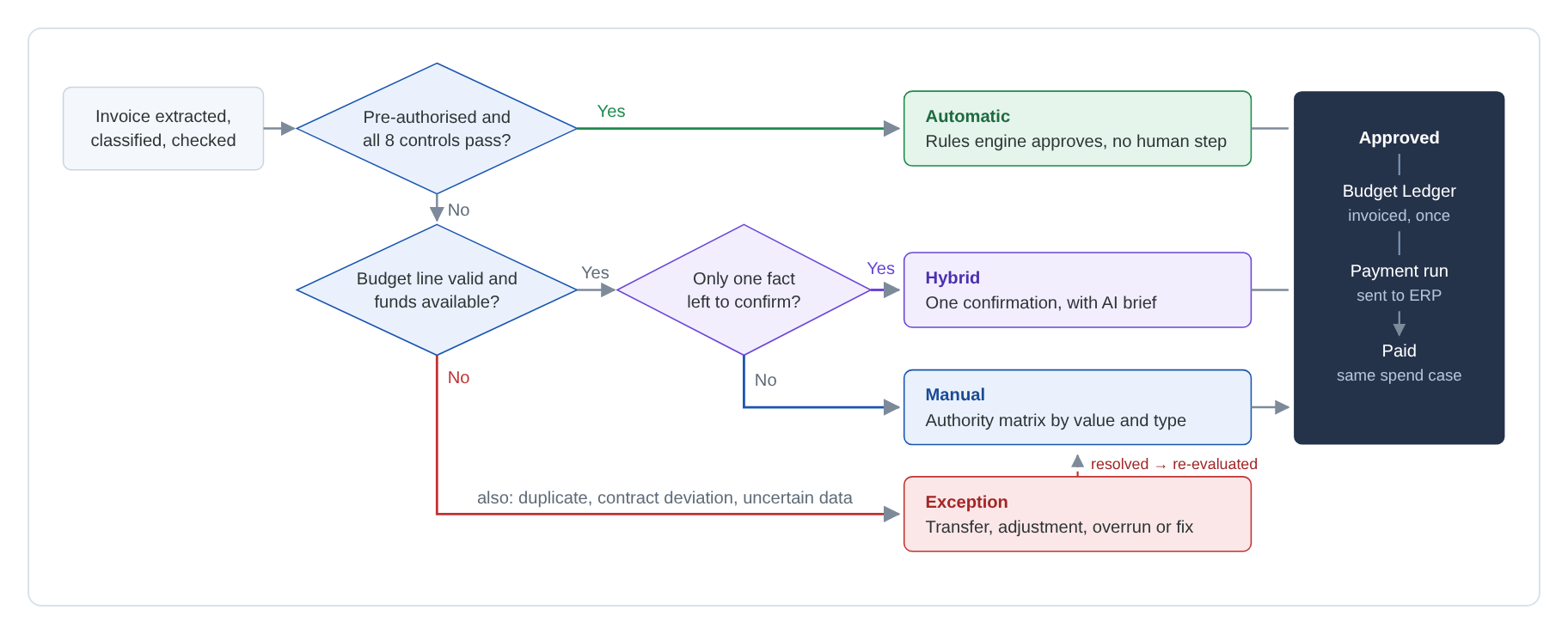
- Approval. The rule set evaluates eight controls: active pre-authorisation, supplier and contract match, per-invoice limit and tolerance, cumulative cap, period, budget allocation and availability, fiscal and duplicate checks, and no open blocks. If all pass, the invoice is approved automatically. Otherwise it follows the hybrid or manual path, with an AI decision brief for the approver.
- Payment and budget execution. Automatic and manual approval end in the same event: the invoice is recorded once in the Budget Ledger as invoiced and becomes ready for payment. Payment runs are sent to ERP, which remains the system of record for accounting and bank payments. The payment confirmation returns as paid on the same spend case and does not reduce the available budget a second time.
Approval paths
A budget line on its own does not grant automatic approval. Only an explicit pre-authorisation, approved during budgeting with a limit, period, supplier and owner, can replace the repeated manual approval. Exceptions never lead to automatic approval.
How AI, data and rules work together
The agents never write to the budget directly. They work through the Vision 365 MCP server, which gives them governed tools over the business semantics layer, with service-account permissions and a log of every call. Decisions that change financial state are taken by the rules engine and the workflow. AI reads, classifies and explains; the automatic approval is always issued by a rule set that Finance has approved, and every decision is logged with the rule, the data evaluated and the time.
Implementation Insights
The company keeps its application and its approval history. The project upgrades the existing circuit on the same platform, so no second approval system needs to be synchronised. No step of the current circuit is removed without a decision; the shortcut applies only where a valid pre-authorisation replaces a repeated approval.
The budget model starts from the Excel workbook. Each workbook row becomes one budget line, which keeps the codes and lets the import reconcile totals by area, CAPEX/OPEX, category and month. Approval rules, thresholds and tolerances are configuration written on roles and authority levels, so they can change without development.
The agents were given read and propose tools only. Their output is a proposal with a confidence score; below the threshold, a person classifies. This keeps the AI useful on day one and keeps every financial decision with the rules and the approvers.
Results & Impact
The company gets one place where every invoice is checked against the budget before it is approved.
Operational Results:
- No retyping. Invoices arrive from RO e-Factura and are read as structured data.
- Routine invoices approved in seconds. Pre-authorised, compliant invoices skip the manual circuit.
- Shorter queues for approvers. People see only the invoices that need them, with the evidence prepared.
- Exceptions in sight. Overruns, duplicates and data issues are blocked and explained before approval.
Business Results:
- Budget control before spending. Available budget is checked per line and month at approval time.
- Actuals from source documents. Invoiced and paid amounts come from approved invoices and ERP, not from manual input.
- Full traceability. Every automatic and manual decision keeps its rule, data, actor and time.
- Ready to extend. The same model connects later to purchase requests, orders and contracts.
Lessons Learned & Key Takeaways
Automatic approval needs an explicit authorisation. Money in the budget shows that an expense is planned; a pre-authorisation with limits, period, supplier and owner is what allows the system to approve on Finance's behalf.
AI earns trust when its role is clear. Agents read, match and explain; rules decide; people confirm. Shared business semantics, exposed through MCP, let the agents work with the same supplier, contract and budget line that Finance sees in its reports.