
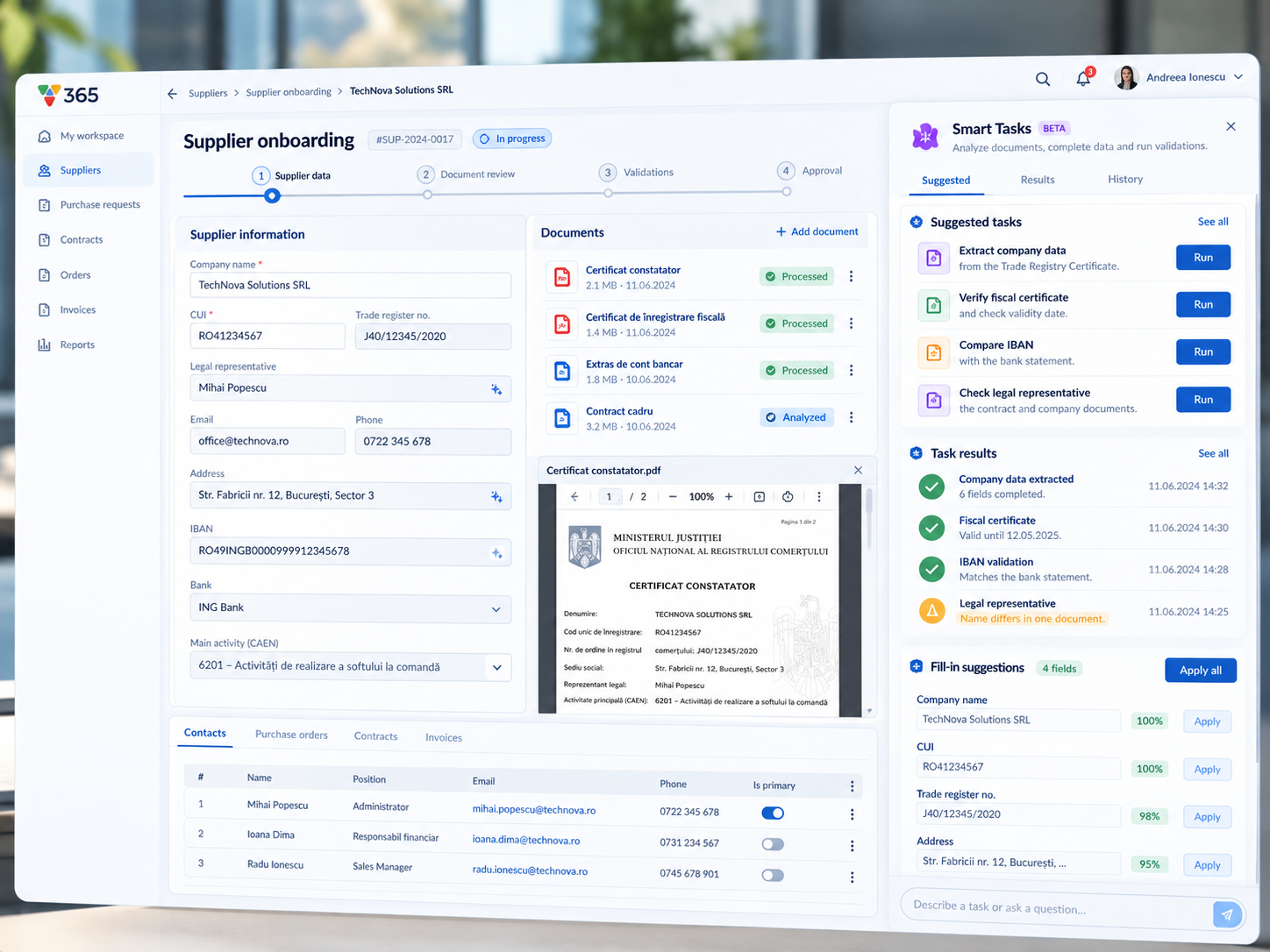
Vision Smart Tasks turn the checks users perform every day into reusable AI-powered actions — directly inside the business process.
Digital workflows are very good at telling people what comes next. Open the case. Review the documents. Complete the form. Approve or reject. Move to the next step.
But there is an important part of the process that traditional workflow systems usually do not see: what the user actually does before making that decision.
A procurement specialist may open a supplier certificate, look for the company registration number, compare it with the value entered in the application, check the bank account against another document, verify that a certificate is still valid and perhaps consult an external system before finally clicking Approve.
The application knows that the case was approved. It does not necessarily know how the user got there.
That is the gap we want to address with Vision Smart Tasks.
Turn everyday checks into AI tasks
Inside a workflow step, Vision already knows the context in which the user is working: the current case, the available documents, form fields, process data, business rules and connected services. Smart Tasks allow the user to put that context to work.
Instead of leaving the application to perform a manual check, the user can describe what needs to be done in natural language. For example:
- Find the company registration number in the Trade Registry Certificate and compare it with the value in the supplier record. Flag the case if they do not match.
- Extract the IBAN from the bank statement and suggest it for the corresponding field.
- Check whether the fiscal certificate is still valid and highlight the result.
The task can use the information already available in that workflow step and return a structured result directly where the user is working. No separate AI application. No copying information into a chatbot. No need to explain the entire case again. The AI already works inside the business context.
From AI assistance to actual work
This is an important distinction. An AI assistant can answer a question. A Smart Task can help perform a piece of work.
It may:
- extract information from documents;
- suggest values for form fields;
- compare information across multiple sources;
- apply existing business rules;
- identify missing or inconsistent information;
- call an external service;
- interpret a result;
- highlight the cases that require human attention.
Consider supplier onboarding. A user receives several documents from a new supplier: a Trade Registry Certificate, a fiscal certificate, a bank statement and a signed agreement. Instead of checking everything manually, Smart Tasks could automatically:
- Extract company data. Company name, registration number, address, legal representative or bank details can be proposed directly from the uploaded documents.
- Check consistency. The information extracted from documents can be compared with the supplier record.
- Validate documents. The system can identify expired or missing documents and highlight information that requires review.
- Use external services. Where integrations are available, the task can retrieve additional information and include it in the validation.
The result is not necessarily a fully automated decision. It is something more practical: the system prepares the case so the user can focus on what actually requires judgement.
Define it once. Use it again.
The most interesting part begins when a useful task does not disappear after the current case. A user can save it. The next time the same workflow step is opened, the task is already available.
Over time, what started as an individual instruction can become part of the way the organization works: Describe → Run → Review → Save → Reuse → Improve → Automate.
A task may initially run only when requested. Later, it can run automatically when the activity is opened. Results can still require confirmation. And once the organization is confident in the task, some actions — such as filling a field or executing a standard check — can become increasingly automated.
This creates a gradual path from AI assistance to process automation, without requiring the organization to redesign the entire process from the beginning.
Learning from real cases
Business rules are rarely perfect on the first day. Neither are AI instructions. That is why feedback is an important part of the model.
If a task extracts the wrong value, the user can correct it. If it looks at the wrong section of a document, the instruction can be refined. If a new exception appears, that case can become part of the task’s validation set.
Instead of treating a prompt as a static piece of text, Vision can treat the Smart Task as something that has:
- a defined context;
- inputs and outputs;
- versions;
- execution history;
- user feedback;
- test cases;
- measurable results.
The task can therefore improve without becoming an uncontrolled black box. The user remains part of the loop.
The workflow starts capturing how work is really done
This has a broader implication. Traditional BPM systems capture the formal process: who performs a task, in which order and with what result.
Smart Tasks can begin to capture another layer: the operational knowledge people use while performing that task. The checks experienced employees repeat every day. The small decisions that were never written in the process diagram. The practical knowledge that often lives in spreadsheets, emails, notes — or simply in people’s heads.
Once this knowledge can be expressed, tested and reused directly in the workflow, it can gradually become part of the application itself.
That is where AI becomes much more than a chatbot attached to enterprise software. It becomes a way for the software to progressively understand how the work is actually done.
Vision Smart Tasks
Teach your workflow how you work. Define it once. Improve it. Reuse it. Automate it.











